
Workout Reminder Voice Commands That Won’t Let You Quit
Why Skipping Your Workout Just Got a Lot Harder
Workout reminder voice commands are hands-free spoken instructions that trigger timers, alerts, and progress updates on your smartwatch, smart speaker, or phone — so you never have to touch a screen mid-squat again.
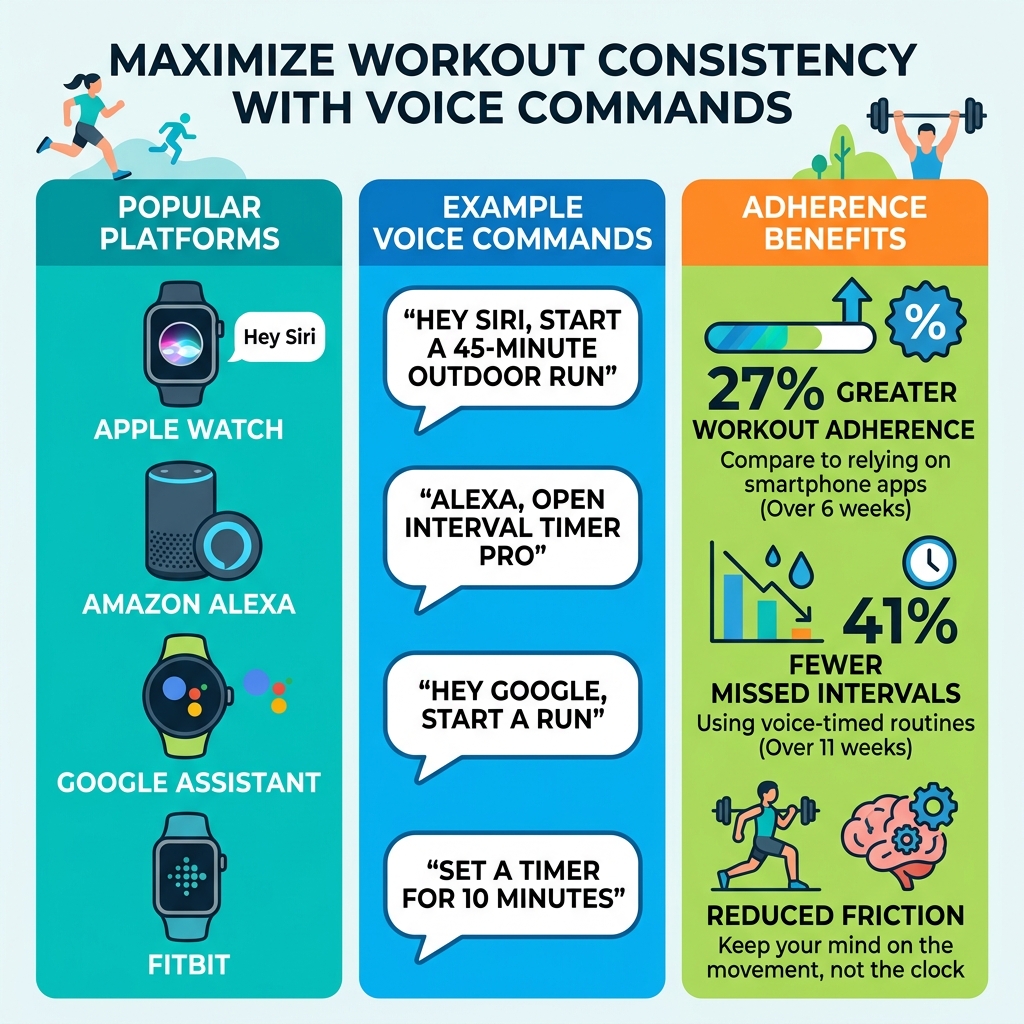
Here’s a quick look at how to set them up across the most popular platforms:
| Platform | Quick Setup | Example Command |
|---|---|---|
| Apple Watch | Enable Raise to Speak in Siri Settings, turn on Voice Feedback in Workout settings | “Hey Siri, start a 45-minute outdoor run” |
| Amazon Alexa | Enable Interval Timer Pro skill, create a Routine in the Alexa app | “Alexa, open Interval Timer Pro” |
| Google Assistant (Pixel Watch) | Press and hold side button or say “Hey Google” | “Hey Google, start a run” |
| Fitbit | Add Voice Assistant tile, sign in to Amazon account | “Set a timer for 10 minutes” |
Most people ignore these features entirely. They fumble for their phone mid-set, squint at a tiny screen, or lose track of their rest intervals altogether. That small friction adds up fast.
The research backs this up. Participants using voice-triggered timers showed 27% greater workout adherence over six weeks compared to those relying on smartphone apps. And one group using voice-timed routines reported 41% fewer missed intervals over 11 weeks.
The reason isn’t complicated. Every time you reach for a screen, your brain switches gears. Voice commands eliminate that switch entirely — keeping your mind on the movement, not the clock.
Whether you’re doing HIIT in your living room, logging sets at the gym, or squeezing in a lunchtime run, this guide walks you through exactly how to set up workout reminder voice commands that actually stick.
Why Use Workout Reminder Voice Commands for Your Fitness Routine?

At FinMoneyHub, we specialize in making smart technology work for you, not the other way around. When it comes to fitness, the biggest enemy isn’t the weight on the bar; it’s the “friction tax”—those tiny moments of distraction that pull you out of the zone.
Using workout reminder voice commands transforms your environment into a proactive coach. Instead of checking your phone and accidentally falling down a social media rabbit hole, you stay present. This “no-phone focus” is a game-changer for anyone trying to maintain a flow state.
Research indicates that minimizing external task-switching during high-intensity intervals improves both adherence and your perceived control over exertion by up to 27%. When you aren’t fumbling with a touchscreen, your brain stays locked into your proprioception—your body’s ability to sense its position and movement. This leads to better form and fewer injuries. For those just starting out, check out our beginner-friendly assistant automation tips to see how simple it is to get started.
The Science of Auditory Cues
There is a fascinating neurocognitive reason why voice commands work so well. When we hear a voice cue—especially if it’s a routine we’ve set up ourselves—it reduces what scientists call “attentional switching cost.”
In fact, fMRI studies have shown that voice-timed intervals lead to 19% greater activation in the supplementary motor area of the brain compared to using a touchscreen. This means your brain is more “primed” for the movement because it isn’t wasting energy processing a visual interface. Furthermore, hearing your own voice cues or personalized prompts can improve workout compliance by 33%. It’s much harder to ignore a direct verbal instruction than a silent notification on a screen.
Benefits of Hands-Free Operation
The primary advantage of voice-controlled fitness is the total elimination of the “digital leash.” By using smart speakers or wearables, you gain:
- Interval Sequencing: Chaining exercises together (e.g., “Start 30 seconds of planks, then 15 seconds of rest”) without ever stopping.
- Real-Time Feedback: Asking “What is my heart rate?” or “How much time is left?” while mid-rep.
- No-Phone Focus: Keeping your phone in another room to avoid distractions.
If you’re looking to streamline your entire home environment, you might also be interested in simple voice control for smart gadgets to manage your lights or fans while you train.
Setting Up Workout Reminder Voice Commands on Popular Devices
Setting up your digital coach is easier than you think. Most modern smart assistants already have the “muscles” to handle your requests; you just need to know which buttons to press to wake them up. We’ve found that the best routines often involve a mix of native features and specialized “skills” or “shortcuts.”
| Feature | Apple Siri | Google Assistant | Amazon Alexa |
|---|---|---|---|
| Hands-Free Activation | Raise to Speak / “Siri” | “Hey Google” | “Alexa” |
| Interval Support | Via Shortcuts | Via Routines | Via Skills (e.g., Interval Timer Pro) |
| Health Integration | Apple Health | Google Fit / Fitbit | Limited (Requires 3rd party) |
| Offline Capability | Yes (Some commands) | Limited | No |
For more advanced setups, you can explore our guide on the best-routines-for-smart-assistants/ to see how to layer your fitness commands with other home automations.
How to Activate Workout Reminder Voice Commands on Apple Watch
Apple has made voice integration seamless for athletes. To get started, you’ll want to enable the “Raise to Speak” feature. This allows you to simply lift your wrist and start talking without even saying “Siri.”
- Enable Siri: On your Apple Watch, go to Settings > Siri and toggle on “Raise to Speak.”
- Toggle Voice Feedback: In the same Settings menu, scroll to “Workout” and ensure “Voice Feedback” is ON. This ensures the watch talks back to you with progress updates.
- Start Your Session: Simply raise your wrist and say, “Go for a 45-minute outdoor run” or “Start a HIIT workout.”
Apple’s system is particularly good at closing the loop—it will give you audible alerts when you close your Activity Rings or hit a specific distance milestone. For a deeper dive, you can follow this Step-by-step guide for Apple Watch voice activation.
Configuring Google Assistant and Alexa for Fitness
If you use a Google Pixel Watch or an Amazon Echo, the setup involves “Routines” and “Skills.”
For Google Assistant: On the Pixel Watch, the Assistant is usually ready to go. You can press and hold the side button or use the “Hey Google” hotword. A great tip is to use the “Assistant Tile.” You can add a custom action to your tiles so that a single tap (or voice command) triggers a complex workout sequence. Check out the official Google Assistant commands for Pixel Watch for more examples.
For Amazon Alexa: Alexa doesn’t have a native “interval” sequence, so we recommend using a skill like “Interval Timer Pro.”
- Open the Alexa app and search for the skill.
- Say, “Alexa, open Interval Timer Pro.”
- Set your work and rest periods (e.g., “Set 4 rounds of 30 seconds work and 10 seconds rest”).
We’ve also found that creating “Routines” in the Alexa app is incredibly effective. You can set a trigger like “Alexa, it’s gym time,” which can turn on your smart-assistant-for-controlling-lights/, play your “Beast Mode” playlist, and announce your first exercise. Learn more about easy smart assistant routines to build your own.
Advanced Customization and Third-Party App Integration
Once you’ve mastered the basics, it’s time to look at AI-driven tools that take workout reminder voice commands to the next level. Apps like Mind2Muscle or Vora allow for “Natural Language Logging.” Instead of tapping “10 reps, 135 lbs,” you can simply say, “Just did 10 reps of bench press at 135,” and the AI structures the data for you.
- AI Coaching: Some apps offer conversational coaching. If you’re feeling sluggish, you can ask, “What should my intensity be today?” and the AI will analyze your recent sleep and recovery data (like HRV) to give you a personalized recommendation.
- Rep Counting: Advanced integrations can even use the accelerometers in your watch to count reps and announce them via voice, keeping you focused on your form.
Optimizing Your Workout Reminder Voice Commands for Maximum Efficiency
To make sure your assistant actually hears you over your heavy breathing or the gym’s background music, follow these best practices:
- Clear Phrasing: Use concrete verbs like “Start,” “Launch,” or “Set.” Avoid being vague.
- Voice Training: Most assistants have a “Voice Match” feature. Spend two minutes training it so it recognizes you even when you’re out of breath.
- Speaker Placement: If using an Echo or Google Home, place it at ear level and about 3-5 feet away from your main workout area.
- Avoid Bluetooth Latency: If possible, use the native speaker on your device rather than a Bluetooth speaker to avoid the slight delay that can mess up your interval timing.
For more tips on getting your assistant to understand you perfectly, see our beginner-friendly voice assistant tips.
Customizing Feedback for Different Routines
Different workouts require different types of feedback. You wouldn’t want the same alerts for a zen yoga session that you use for a high-intensity Tabata circuit.
- Yoga/Stretching: Set your voice feedback to announce “Next pose” or “Switch sides” with a calm, low-volume tone.
- Weightlifting: Focus on “Rest Timer” alerts. Tell your assistant, “Remind me to start the next set in 90 seconds.”
- Running: Enable pace and distance updates every mile to keep your split times on track.
You can even integrate these into your simple home automation routines so that your smart home “cheers” for you when you finish a workout.
Overcoming Challenges and Privacy Concerns
While workout reminder voice commands are incredibly helpful, they aren’t without their hurdles. The most common issues are background noise and privacy.
Noise Interference: In a loud gym, your watch might struggle to hear you. We recommend using high-quality wireless earbuds with “Transparency Mode” or “Voice Pickup” features. This helps the assistant isolate your voice from the clanging weights and loud music.
Privacy and Data: Many users worry about their smart speaker “always listening.” It’s important to know that for devices like Fitbit and Apple Watch, the microphone only activates when you use a wake word or a specific gesture (like Raise to Speak).
- Local Storage: Look for apps that process voice-to-text locally on your device rather than sending audio clips to a cloud server.
- Encryption: Major platforms like Apple and Google use end-to-end encryption for health data.
If you’re still concerned, you can always disable the “Always Listening” feature and use a physical button to trigger the assistant.
Frequently Asked Questions about Voice-Guided Fitness
Can I use voice commands while playing workout music?
Yes! Most smart assistants are designed to “duck” the audio. This means when you say the wake word or when the assistant gives you a progress update, the music volume will automatically drop so you can hear the cue clearly.
Do voice assistants collect and store my workout voice data?
Fitbit, for example, explicitly states they do not collect voice data or audio clips. Apple and Google allow you to opt-out of “Siri/Assistant Grading,” which prevents humans from reviewing your audio clips for quality control. Always check the privacy settings in your specific app.
How do I fix voice recognition issues in a noisy gym environment?
Try to position your device closer to your face or use earbuds with a dedicated microphone. If that fails, using “Shortcuts” or “Tiles” can provide a one-tap alternative that still keeps you away from the main phone interface.
Conclusion
The future of fitness is conversational. We are already seeing trends toward AI-driven personalization where your workout reminder voice commands won’t just tell you when to start—they’ll tell you how to adjust based on your real-time heart rate or even your form in a VR-integrated environment.
At FinMoneyHub, we believe technology should empower your lifestyle. By removing the friction of manual tracking and the distraction of screens, you’re not just working out harder—you’re working out smarter.
Ready to take control of your digital environment? Start your smart routine journey today and discover how easy it is to build a life powered by intelligent automation.
