The Simplest Way to Automate Your Smart Home With a Single Tap

NFC tags for home automation are small, affordable stickers with a microchip inside that trigger smart home actions the moment you tap your phone against them — no voice commands, no app-digging, no fuss.
Here are the top-rated NFC tags to buy right now:
| Product | Chip | Memory | Best For |
|---|---|---|---|
| SwitchBot Tag | NTAG216 | 888 bytes | SwitchBot ecosystem scenes |
| SONOFF NFC Tag | NTAG215 | 540 bytes | eWeLink smart scenes |
| Taggytech Smart NFC Key-Tag | NTAG216 | 888 bytes | Durable everyday use |
| BroadLink NFC Tags 5-Pack | NTAG215 | 504 bytes | Multi-room budget setups |
They work with both Android (5.0+) and iOS (13+), cost just a few cents to a few dollars each, and require zero wiring.
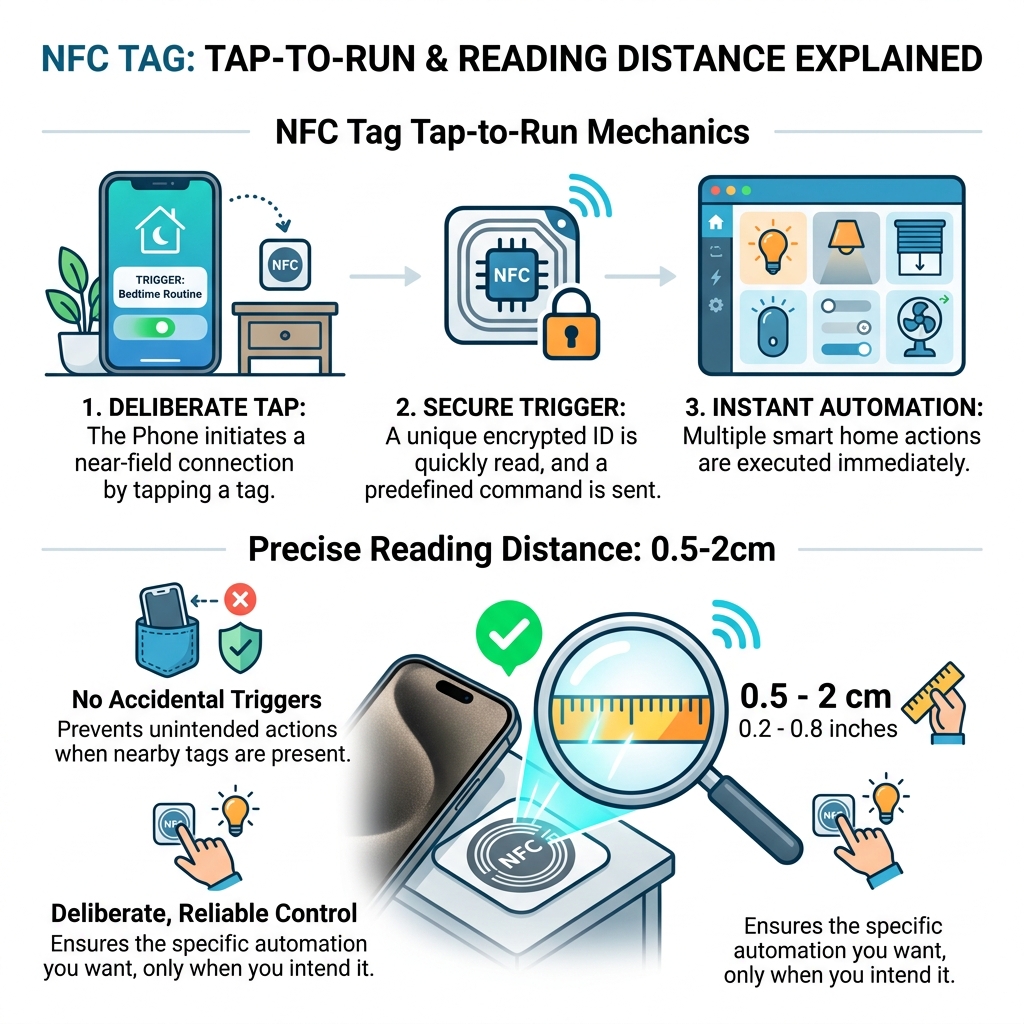
You place a tag by your bed, your front door, your washing machine — anywhere you repeat a task. One tap runs the whole routine automatically.
The reading distance is just 0.5 to 2cm, which means activation is deliberate and reliable. No accidental triggers.
They’re especially useful if you’re tired of juggling multiple apps or telling a voice assistant to do five things in a row. One tap handles it all.
Top Rated NFC Tag Options to Buy Right Now
When we look for the best nfc tags for home automation, we aren’t just looking at a piece of plastic. We are looking at the “brain” inside—the chip. Most tags you’ll find today use either the NTAG215 or NTAG216 chip. While they look identical on the outside, the difference lies in their storage capacity and how many “instructions” they can hold.
The NTAG215 is the industry standard, offering about 540 bytes of data. This is more than enough for simple URL triggers or basic smart home commands. However, if you are looking for something more robust, the NTAG216 chip bumps that up to 888 bytes. This extra room is perfect for storing complex contact information or multi-step Wi-Fi credentials.
Here is a closer look at the top contenders we recommend for your home:
- SwitchBot Tag | NFC Smart Home Control Tags: These are a fantastic entry point, especially if you already use SwitchBot products. They use the high-capacity NTAG216 chip and are built with waterproof ABS material. They even come with blank stickers so you can label them yourself.
- SONOFF NFC Tag: These are incredibly durable. They feature a built-in anti-metal layer, which is a huge deal. Normally, if you stick an NFC tag on a metal fridge or a computer case, the metal interferes with the signal. SONOFF solved this, making them perfect for kitchen appliances.
- Smart NFC Tags NTAG216 | Taggytech: If you don’t want a sticker, these epoxy-coated key fobs are the way to go. They are stylish, waterproof, and can be attached to your keychain, making them ideal for “returning home” routines.
- BroadLink NFC Tags, 5-Pack: This is the best “bang for your buck” option. They come with 40 pre-printed scene stickers (like a little icon for a lamp or a TV), so you don’t have to guess what each tag does.
High-Capacity NTAG216 Stickers
If you are planning on setting up some truly simple smart home automation ideas, we suggest reaching for the NTAG216 stickers. With 888 bytes of memory, these tags are the “power users” of the NFC world.
Why does memory matter? While a simple “turn on light” command takes almost no space, more complex routines—like sharing a guest Wi-Fi password that includes a long security key—can actually hit the limit of smaller tags. Using NTAG216 ensures you never run out of room for those sophisticated, multi-device commands we love to build at FinMoneyHub.
Durable Waterproof and Anti-Metal Tags
One thing we’ve learned the hard way is that environment matters. If you place a standard paper NFC sticker on your outdoor gate, it’s going to peel off after the first rain. That’s why we advocate for tags made from ABS material or those with a PVC casing.
Waterproof tags, like the SwitchBot Tag | Vedenpitävät NFC-tunnisteet | SwitchBot EU, use 3M adhesive to stay put through humidity and heat. Furthermore, if you’re placing a tag on a security panel or a metal door frame, ensure it has interference protection. This “anti-metal” layer acts as a shield, allowing your phone to read the chip even when it’s pressed against a conductive surface. This is vital for simple security automation ideas for your smart home, where reliability is non-negotiable.
Creative Ideas for Using NFC Tags in Your Daily Routine
The magic of nfc tags for home automation isn’t just the tech—it’s the creativity you bring to it. Because they are so cheap (often just a few cents a piece), you can put them everywhere.

One of our favorite “quality of life” hacks involves the laundry. We’ve all forgotten a load of wet clothes in the washing machine. By sticking an NFC tag on the lid, you can tap it to automatically set a 60-minute “Laundry’s Done!” timer on your phone and smart speakers. It’s one of those easy smart appliance automation tricks that saves you from that “musty towel” smell.
Here are a few more ways we use them:
- The Guest Wi-Fi Portal: Stick a tag in your hallway or guest room. When friends visit, they just tap the tag, and their phone automatically joins your Wi-Fi. No more reading out “Password123!” for the tenth time.
- The Bedside “Goodnight”: Place a tag on your nightstand. A single tap can turn off all the lights, lock the front door, set your morning alarm, and put your phone into “Do Not Disturb” mode.
- The Grocery List Binder: Running low on eggs? Tap a tag on the fridge or inside your pantry to instantly add them to your shared digital grocery list.
Streamlining the Entryway
The entryway is the most high-traffic area for automation. By placing a tag near your front door, you can trigger routines that would otherwise require multiple steps. For example, a “Leaving Home” tag can turn off every smart plug in the house, lower the thermostat, and arm your security system.
If you have a smart lock, NFC tags provide a great fail-safe. Sometimes geofencing (which unlocks the door as you drive up) can be a bit finicky. Having a tag hidden on the porch allows you to tap your phone and trigger the unlock command instantly. It’s all about making integration easy for smart locks.
Kitchen and Household Management
In the kitchen, nfc tags for home automation act like digital sticky notes. We love placing a tag near the coffee machine that links directly to a digital copy of the cleaning instructions. No more hunting for the manual when that “Descale” light starts blinking!
You can also use them for simple home automation routines like setting precise kitchen timers. A tag on the microwave could set a perfect 3-minute “popcorn” timer, while one by the stove handles the pasta water. It’s about removing the friction from your daily chores.
How to Set Up nfc tags for home automation
Setting up these tags is surprisingly easy, and you don’t need to be a coder to do it. Most modern smartphones have the hardware built-in; you just need the right software to “write” the instructions to the tag.
Configuring nfc tags for home automation on iOS and Android
For iPhone users, the Siri Shortcuts app is your best friend. You don’t even need to “write” data to the tag in the traditional sense. Instead, you tell your iPhone to recognize a specific tag’s unique ID and perform an action whenever it sees it.
- Open the Shortcuts app and go to the “Automation” tab.
- Tap “Create Personal Automation” and select “NFC.”
- Scan your physical tag and give it a name (e.g., “Nightstand”).
- Add your actions—like turning off smart lighting or playing a “Sleep” playlist.
Android users have even more flexibility. Using apps like NFC Tools, you can actually write data directly onto the tag. This means the tag can store a Wi-Fi password or a URL that any phone can read, even if they don’t have your specific automation apps installed. This is great for sharing information with guests.
Advanced Integration with Home Assistant
For those who want to dive deeper into the easy DIY home automation projects, Home Assistant offers incredible NFC support. While the mobile app has a built-in tag creator, many enthusiasts prefer using webhooks.
By using a webhook, you can trigger an automation on your central server from a simple URL. This allows you to create “guest-friendly” tags that don’t require the guest to have the Home Assistant app installed. You can even use desktop NFC readers to program your tags in bulk, which is much faster if you’re setting up a whole house. Just remember to keep your webhooks set to “local network only” for better security!
Important Considerations for Choosing nfc tags for home automation
Before you go out and buy a 50-pack of stickers, there are three things you need to keep in mind:
- Memory Capacity: As we mentioned, NTAG215 (540 bytes) is usually fine, but NTAG216 (888 bytes) gives you more breathing room for complex scripts.
- Read Distance: NFC is designed for “Near Field” communication. You generally need to be within 0.5cm to 2cm for the tag to trigger. This is a feature, not a bug—it prevents your phone from triggering the “Leave Home” routine just because it’s sitting on a table near the door.
- Durability: If you’re sticking a tag on a smart power strip, a basic paper sticker is fine. If it’s going on a keychain or a car dashboard, look for epoxy or ABS plastic.
Are nfc tags for home automation Secure?
Security is a common concern. Could someone walk by your house and “scan” a tag through the window to unlock your door? Highly unlikely, given the 2cm read range. However, for added peace of mind, you can password-protect your tags using apps like NFC Tools. This prevents someone else from overwriting your “Unlock Door” tag with a link to a prank video.
For high-security areas, we recommend using the “local network” setting in your home security automations. This ensures that even if someone manages to copy the tag’s data, the command won’t run unless the phone is also connected to your home’s private Wi-Fi.
Compatibility and Hardware Requirements
To use nfc tags for home automation, you need a compatible phone. For Apple, that’s any iPhone from the XR/XS onwards running iOS 13 or later. For Android, almost any mid-to-high-range phone from the last five years (running Android 5.0+) will have NFC capabilities.
Some ecosystems, like SwitchBot, might require a specific hub (like the SwitchBot Hub Mini) to translate the NFC tap into a command for their infrared devices. Always check if your specific smart assistant requires a bridge to talk to the tags.
Conclusion
At FinMoneyHub, we believe that the best technology is the kind that gets out of your way. NFC tags for home automation are the ultimate “invisible” tech. They are incredibly affordable, require no batteries, and allow you to execute complex command capabilities with a simple physical gesture.
Whether you’re looking to simplify your morning routine or make your home more accessible for guests, these tiny stickers are the most cost-effective upgrade you can make. So, grab a pack of BroadLink NFC Tags or some high-capacity SwitchBot Tags and start your automation journey today. Your future, more efficient self will thank you!
