
The ultimate guide to home automation tips
What Are Home Automation Tips and Why Do They Matter?
Home automation tips are practical strategies that help you connect, control, and automate the devices in your home — saving you time, energy, and frustration.
Here are the most important ones to know:
- Start small — pick one area like lighting or security before expanding
- Choose a compatible ecosystem — Google Home, Apple HomeKit, or Amazon Alexa
- Set up a reliable Wi-Fi network — use a mesh system for full coverage
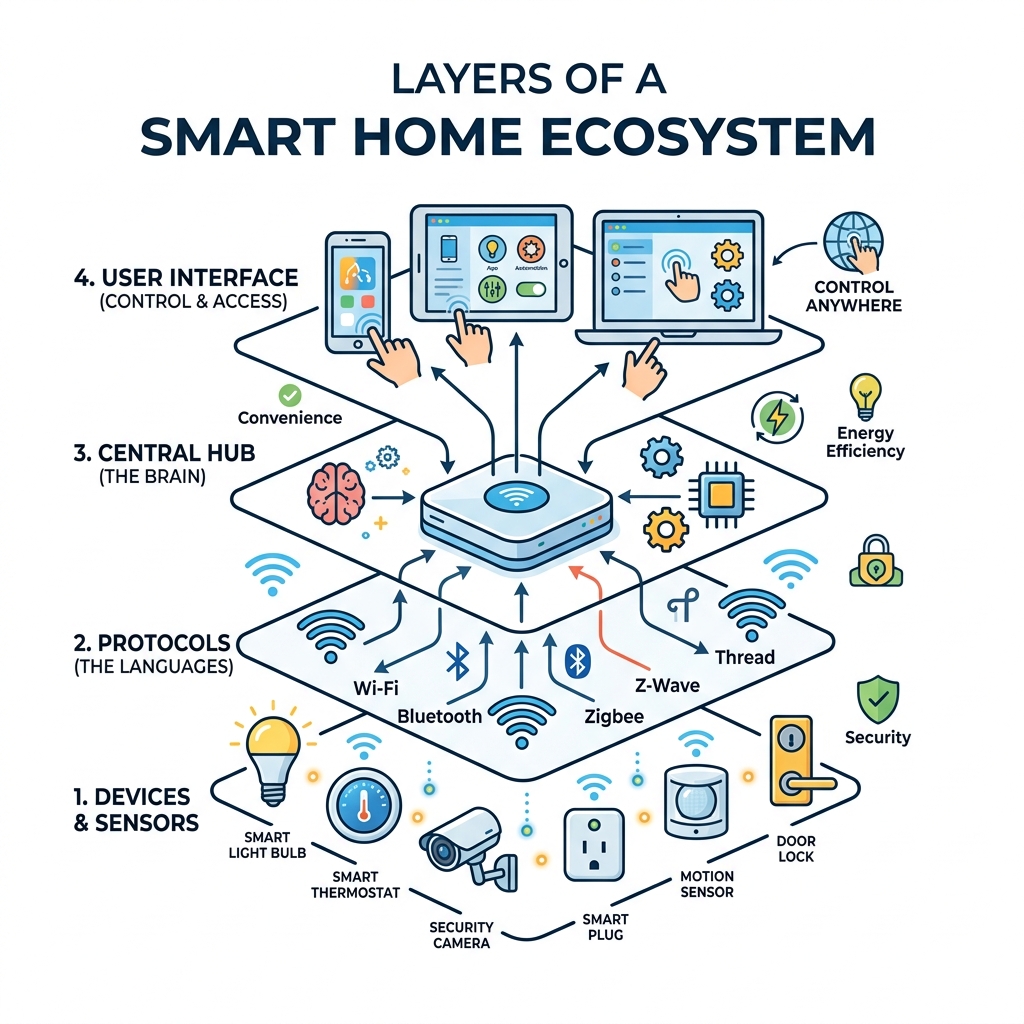
- Use a smart hub — it acts as the brain connecting all your devices
- Automate by triggers — time of day, motion, location, or sunrise/sunset
- Secure your network — use WPA3 encryption and strong, unique passwords
- Keep automations simple — the best ones run quietly in the background
Smart homes used to be a hobby for tech enthusiasts. Today, they’re practical for almost anyone.
At the core, home automation means using technology to control devices in your home automatically — without you having to lift a finger every time. Your lights turn on when you walk in. Your thermostat adjusts when you leave. Your security system arms itself at bedtime.
It works through the Internet of Things (IoT) — a network of devices that communicate with each other through protocols like Wi-Fi, Bluetooth, Zigbee, and Z-Wave.
The payoff is real. A well-automated home is:
- More convenient — fewer manual tasks throughout your day
- More energy efficient — devices run only when needed
- More secure — sensors and cameras respond automatically to threats
But here’s the catch: getting it wrong is easy. The wrong ecosystem, a weak network, or overly complex automations can turn your smart home into a frustrating mess.
This guide walks you through everything — from picking your first device to building routines that genuinely make your life easier.
Essential Home Automation Tips for Beginners

When we first dive into smart tech, it’s tempting to buy every gadget on the shelf. We want the smart fridge that tells us when the milk is sour and the curtains that open with a dramatic flourish. However, the best home automation tips for beginners all start with one word: gradual.
Start Small and Prioritize
Building a smart home is a marathon, not a sprint. We recommend starting with one high-impact area. For most of us, that’s either lighting, climate control, or security. Ask yourself: “What is the most annoying repetitive task I do every day?” If you’re constantly forgetting to turn off the porch light, start there. If you hate coming home to a freezing house, a smart thermostat is your first win.
Taking a gradual approach helps you manage the learning curve and the cost. It also prevents “tech fatigue,” where you have so many new apps that you stop using them entirely. For more on how to begin without the headache, check out our guide on First Steps to Mastering Smart Home Assistants.
Selecting Your Ecosystem
Before you buy a single bulb, you need to pick a “brain” for your home. This is your ecosystem. The big three are:
- Amazon Alexa: Great for device compatibility and ease of use. If you want a simple start, follow these Easy Setup for Alexa at Home steps.
- Google Home: Excellent for those already in the Google/Android ecosystem. We have some Simple Google Home Setup Tips to get you moving.
- Apple HomeKit: The gold standard for privacy and deep integration with iPhones, though device selection can be slightly more limited.
Consistency is key. While you can mix and match, your life will be much easier if your devices all talk to the same assistant. For those just starting out, these Beginner-Friendly Assistant Automation Tips will help you choose the right path.
Budget Planning
Smart tech can get expensive quickly. Set a budget for your “Phase One.” A basic starter kit (a smart speaker, a few bulbs, and two smart plugs) can cost under $150. Advanced systems with professional security and multi-room audio can climb into the thousands. By planning your budget early, you avoid the trap of buying “cheap” devices that don’t work with your main system.
Choosing Your Central Hub and Ecosystem
While your smartphone can control many devices, a central hub is what turns a collection of gadgets into a true automated system.
The Power of Protocols: Matter, Zigbee, and Z-Wave
Most basic devices use Wi-Fi, but as your home grows, too many Wi-Fi devices can slow down your internet. This is where specialized protocols come in:
- Matter: This is the new industry standard. It’s designed to make sure devices from different brands (like Apple, Google, and Amazon) all work together seamlessly. Look for the Matter logo on new purchases!
- Zigbee and Z-Wave: these are “mesh” networks. Instead of every device talking to your router, they talk to each other. This is great for large homes and reduces the strain on your Wi-Fi.
Local vs. Cloud Processing
Some systems (like Amazon Alexa) process your commands in the “cloud.” This means if your internet goes out, your smart home might stop working. Others (like Home Assistant or certain Apple HomeKit setups) use “local processing,” which is faster and keeps your data inside your four walls.
If you find yourself managing multiple assistants, you might want to look into Connecting Multiple Smart Assistants to keep everything synchronized. To manage all of this from your phone, explore the Smart Home Automation Apps for Beginners.
Foundational Home Automation Tips for Lighting and Power
Lighting is the “gateway drug” of home automation. It’s visible, satisfying, and relatively easy to set up.
Smart Plugs: The Unsung Heroes
The humblest and most versatile tool in your arsenal is the smart plug. It can make “dumb” appliances smart. We use them for coffee makers, fans, and even Christmas lights. By plugging a lamp into a smart plug, you can schedule it to turn on at sunset. Check out our Beginner Guide to Smart Plugs to see how these little devices can transform your home.
Smart Bulbs and Switches
You have two choices here:
- Smart Bulbs: Easy to install (just screw them in). Great for renters or if you want color-changing features.
- Smart Switches: Better for whole-room control. They replace your existing wall switch, meaning you can still use the physical switch without “killing” the smart functionality.
For a fun weekend project, try some Easy DIY Smart Lighting Projects You Can Try at Home. Once you have the hardware, the magic happens with scheduling. We’ve put together a guide on Understanding Smart Light Scheduling for Beginners to help you wake up with “artificial sunlight” every morning. You can even use a Smart Assistant for Controlling Lights with just your voice.
For more inspiration, see These are the best ways to automate lighting in your smart home.
Optimizing Your Network and Security
A smart home is only as smart as the network it runs on. If your Wi-Fi is spotty, your “smart” locks will become very frustrating “dumb” locks very quickly.
Strengthening Your Wi-Fi
- Mesh Wi-Fi: If you have a larger home, a single router isn’t enough. Mesh systems (like Eero or Google Nest Wifi) use multiple nodes to blanket your home in signal.
- Router Placement: Keep your router in a central, unobstructed location. Don’t hide it in a metal cabinet!
- WPA3 Encryption: When setting up your network, use WPA3—the most secure encryption available today.
Security Best Practices
Security is the number one concern for most new users. Here is how we keep our systems safe:
- Unique Passwords: Never use the default password that came with the device.
- Multi-Factor Authentication (MFA): Always enable this. It requires a code from your phone to log in, adding a massive layer of protection.
- Firmware Updates: Set your devices to auto-update. Manufacturers frequently release patches to fix security holes.
- Network Segmentation: If your router allows it, put your smart devices on a “Guest” network. This keeps them separate from your personal computers and bank accounts.
For a deeper dive into protection, read our Essential Tips for Securing Your Smart Home Devices. You can also implement Simple Voice Control for Smart Gadgets to manage security settings hands-free.
Enhancing Safety with Smart Sensors
Sensors are the “eyes and ears” of your home. They allow your home to react to the environment without you saying a word.
Motion and Contact Sensors
- Motion Detectors: These are perfect for hallways or bathrooms. No more fumbling for a switch in the middle of the night! We recommend Setting Up Your Smart Motion Detector: A Quick Guide for Beginners to get started.
- Contact Sensors: Place these on doors and windows. They can alert you if a window is opened while you’re away or even turn off the AC if the patio door is left open.
Smart Locks and Entry
Smart locks provide keyless entry and allow you to give temporary “keys” to guests or contractors. Our Integration Made Easy: A Beginner’s Guide to Smart Locks explains how to blend these into your security routine. Combined with Simple Security Automation Ideas for Your Smart Home: A Guide for Beginners, you can create a home that “locks itself down” when you go to bed.
Environmental Safety
Don’t forget about water leak detectors and smart smoke alarms. A $30 water sensor under your dishwasher can save you $30,000 in floor repairs by alerting your phone the second a leak starts.
Advanced Home Automation Tips for Routines and Logic
The real magic happens when you move beyond “on/off” and start using logic.
Geofencing and NFC Tags
- Geofencing: This uses your phone’s GPS to trigger actions. When you pull into your driveway, the garage door opens and the entryway lights turn on.
- NFC Tags: These are tiny, cheap stickers you can place around your house. Tap your phone to a tag on your nightstand to trigger a “Goodnight” routine that locks the doors and dims the lights.
Mastering Routines
Routines allow one trigger to cause multiple actions. A “Movie Night” routine could dim the lights, close the smart blinds, and turn on the TV all at once. Check out the Best Routines for Smart Assistants for some inspiration. We also have guides for Simple Home Automation Routines and Easy Smart Assistant Routines to help you get creative.
Common Mistakes to Avoid
We’ve all been there: you walk into the living room, the lights turn on, you sit down to read, and 10 minutes later—darkness. Why? Because you weren’t moving enough for the motion sensor. This is the “single-sensor trap.”
To avoid these frustrations, check out I’m tired of people doing these 6 smart home automations the wrong way and 5 smart home automations that actually make my life easier (and 2 that were a waste of time).
One of our favorite home automation tips is to use solar event triggers. Instead of setting lights to turn on at 6:00 PM (which is too late in winter and too early in summer), set them to “30 minutes before sunset.” Your home will naturally adapt to the seasons!
Maximizing Energy Efficiency and Climate Control
One of the best reasons to invest in a smart home is the impact on your wallet. Smart devices don’t just add convenience; they cut waste.
The Impact of Smart Climate Control
Heating and cooling are the biggest energy hogs in most homes. A smart thermostat learns your schedule and adjusts itself when you aren’t home. Research shows that smart thermostats can significantly lower energy bills by adjusting temperatures based on occupancy patterns.
To get started, follow our Smart Thermostat Setup for Beginners.
Standby Power and Smart Plugs
Did you know that “vampire power”—the energy used by devices like TVs and chargers while they are “off”—can account for a huge chunk of your bill? By using smart plugs to completely cut power to your entertainment system at night, you can see a 5–12% reduction in standby-related electricity use.
| Device Type | Potential Energy Saving | Automation Tip |
|---|---|---|
| Smart Thermostat | 10-15% on HVAC costs | Set “Away” modes based on geofencing |
| Smart Lighting | 70-90% vs Incandescent | Use motion sensors to ensure lights are never left on |
| Smart Plugs | 5-12% of standby power | Schedule power-off for “vampire” devices at night |
| Robot Vacuums | 20-80 kWh/year | Schedule cleaning during off-peak energy hours |
For more ways to save, explore our Energy-Saving Tips with Smart Devices and Smart Assistant Energy Saving Tips.
Advanced Energy Automations
We love using “off-peak” scheduling. Many utility companies charge less for electricity late at night. You can automate your dishwasher or EV charger to run only during these hours. Integrating Using Smart Sensors for Energy Efficiency allows your home to turn off the heat if it detects an open window.
You can even dive into Easy Smart Appliance Automation to manage your heavy hitters like dryers and water heaters. For a deeper look at how to keep things green, read Homedesigns.Store | Set It and Forget It: Automations That Make Your Home Cleaner and More Energy Efficient | Hearth & Weave.
Frequently Asked Questions about Home Automation
What is the difference between a smart home and home automation?
While people use these terms interchangeably, there is a subtle difference. A smart home refers to a house with devices you can control remotely (like turning on a light via an app). Home automation is when those devices act on their own based on schedules or triggers (like the light turning on automatically because it’s dark outside).
Essentially, a smart home is the infrastructure, and automation is the logic. For some inspiration on the logic side, check out these Simple Smart Home Automation Ideas.
How much does it cost to start a smart home?
You can start for as little as $30 with a single smart plug or bulb. A basic whole-room setup usually costs between $100 and $300. If you’re looking to do a full-house integration with professional monitoring, expect to spend $2,000+. The beauty of the DIY approach is that you can scale as you go. Try these Easy DIY Home Automation Projects to see how much you can do on a budget.
Can I integrate different brands into one system?
Yes! This is becoming much easier thanks to the Matter protocol. Most devices now work with at least two of the major assistants (Alexa, Google, or Siri). Third-party apps like IFTTT (If This Then That) can also bridge the gap between brands that don’t natively talk to each other. For help with the timing of it all, see Smart Home Scheduling for Beginners.
Conclusion
The journey to a fully automated home is one of the most rewarding tech projects you can take on. It’s not just about the “wow” factor of voice-controlled lights; it’s about creating a living space that works for you, saves you money, and keeps your family safe.
At FinMoneyHub, we specialize in helping you navigate this intersection of technology and efficiency. Whether you are looking for easy ways to lower your utility bills or complex command capabilities for your digital devices, we are here to simplify the process. Smart technology shouldn’t be a burden—it should be a silent partner that makes your daily life smoother.
Ready to take the next step in your automation journey? Start your smart journey today and explore our full library of routines and tips designed to make your home work for you.
