
Stop Shouting at Your House with This Easy Smart Assistant Setup
Why an Easy Smart Assistant Setup Transforms How You Control Your Home
Easy smart assistant setup doesn’t have to mean hours of frustration, tangled cables, or yelling “HEY ALEXA” three times before anything happens.
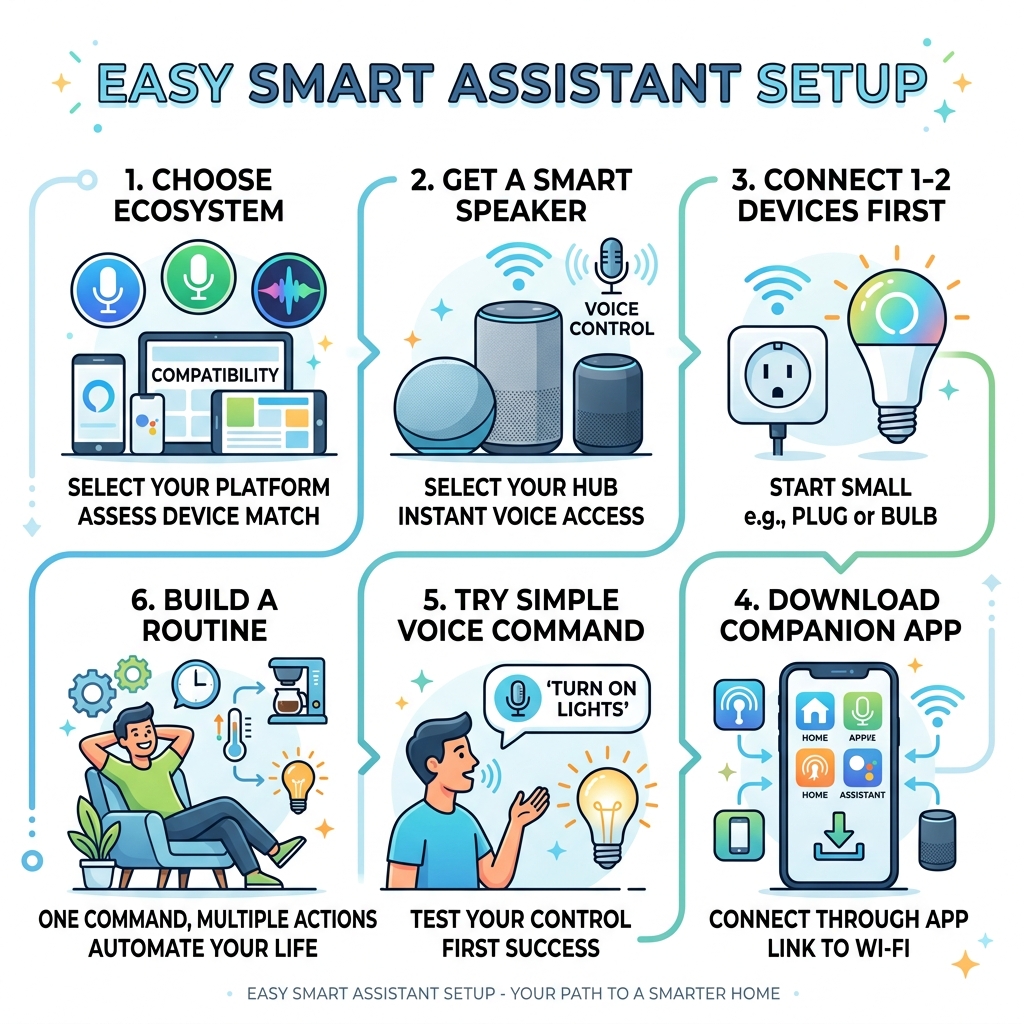
Here’s the quickest path to getting started:
- Pick an ecosystem – Choose Amazon Alexa, Google Assistant, or Apple Siri based on your phone and existing devices
- Get a smart speaker – An Echo, Nest, or HomePod mini gives you instant voice control
- Connect 1-2 devices first – Start with a smart plug or smart bulb, not your entire house
- Download the companion app – Connect everything to your Wi-Fi through the official app
- Try a simple voice command – “Turn off the kitchen lights” is a great first test
- Build a routine – One command like “Good morning” can trigger lights, thermostat, and more at once
That’s genuinely it for the basics. Everything else is just expansion.
Imagine walking through your front door and having the lights turn on automatically, your thermostat already at the right temperature, and your coffee brewing – all without touching a single switch. That’s not science fiction anymore. It’s what a properly configured smart assistant does on a Tuesday.
But most people never get there. They buy a smart speaker, ask it what the weather is, and call it done. The real power is in connecting your devices and automating your routines – and that’s where this guide comes in.
The good news? You don’t need to be a tech expert. You don’t need a full smart home overhaul. You just need the right starting point.
Choosing Your Foundation: The Best Ecosystem for an Easy Smart Assistant Setup
Before you buy a single light bulb, you need to decide on the “brain” of your home. We call this the ecosystem. While it might be tempting to buy whatever is on sale, sticking to one primary system makes for a much more easy smart assistant setup.
The big three players are Amazon Alexa, Google Assistant, and Apple Siri.
- Amazon Alexa: Known for having the widest range of compatible devices. If you want to automate everything from your microwave to your garden shears, Alexa is a strong contender.
- Google Assistant: Often praised for being the “smartest” in terms of understanding natural conversation. It integrates perfectly if you are already using Google Calendar and Gmail.
- Apple Siri (HomeKit): The gold standard for privacy and security. It is more restrictive about which devices can join the party, but it works seamlessly if everyone in your house has an iPhone.
When looking toward the future, keep an eye out for the Matter standard. This is a new industry-wide agreement that allows different brands to talk to each other more easily. If a device has the Matter logo, it should work with Alexa, Google, and Apple regardless of who made it. Older protocols like Zigbee and Z-Wave are also excellent because they create a “mesh network” that doesn’t clog up your home Wi-Fi, though they often require a small bridge or hub to function.
To help you decide, we’ve put together a comprehensive guide on the best smart home assistants for 2026 to see how these systems are evolving with AI.
| Feature | Amazon Alexa | Google Assistant | Apple Siri (HomeKit) |
|---|---|---|---|
| Ease of Setup | High | High | Medium |
| Voice Accuracy | Good | Excellent | Good |
| Device Selection | Massive | Large | Moderate |
| Privacy Focus | Moderate | Moderate | High |
| Best For | Smart Home Beginners | Android/Google Users | Apple Enthusiasts |
Essential Hardware for a Stress-Free Start

The biggest mistake we see beginners make is trying to do too much too fast. You don’t need a smart refrigerator yet. To achieve an easy smart assistant setup, we recommend starting with these foundational pieces of hardware:
1. Smart Speakers and Displays
This is your interface. A smart speaker (like an Echo Dot or Nest Mini) is the most affordable entry point. If you want to see your security camera feeds or follow recipes, a smart display (like the Nest Hub Max or Echo Show) adds a visual layer. Some users even prefer high-end audio options like the Sonos Era 100 for better music quality while maintaining voice control.
2. Smart Plugs
These are the unsung heroes of home automation. A smart plug can turn a “dumb” lamp, a fan, or an old coffee maker into a smart device. If it has a physical on/off switch, a smart plug can control it. Check out our tips on affordable smart assistants for the home to find budget-friendly plug options.
3. Smart Bulbs and Switches
Lighting is usually the first thing people want to automate. Smart bulbs (like Philips Hue) are the easiest to install—just screw them in. Smart switches are better for controlling ceiling fans or groups of lights, but they require a bit of basic wiring knowledge. For more help, read our smart speaker setup for beginners guide.
4. Smart Thermostats
While slightly more complex to install, a smart thermostat offers the biggest “wow” factor by saving energy and adjusting the temperature based on whether you are home or away.
Connecting Your Devices Without the Headache
Once you have your hardware, it’s time to get everything talking. Most modern devices use your Wi-Fi network to communicate. Here is our foolproof method for connecting them:
- Download the Manufacturer’s App: Even if you plan to use Alexa or Google to control the device, you usually have to set it up in the manufacturer’s own app first (e.g., the Kasa app for TP-Link plugs).
- Create an Account: You’ll need to register the device so it can be accessed via the cloud.
- Enable Bluetooth: Many new devices use Bluetooth for the initial “handshake” to find your phone and pass over the Wi-Fi credentials.
- Device Discovery: Once the device is on your Wi-Fi, open your main assistant app (Alexa or Google Home) and look for “Add Device” or “Discover Devices.”
Initial Configuration for an Easy Smart Assistant Setup
Network stability is the backbone of a smart home. If your router is hidden in a basement closet, your smart bulbs in the bedroom will struggle to stay connected. We recommend placing your router in a central location or using a mesh Wi-Fi system to ensure a strong signal everywhere.
When naming your devices, keep it simple. Don’t name a lamp “Living Room Corner Lamp 1.” Just call it “Corner Lamp.” If you have multiple lights in one room, assign them to a “Room” in the app so you can say, “Turn off the living room,” and they all shut down at once. For more specific platform advice, see our easy setup for Alexa at home or our simple Google Home setup tips.
Linking Third-Party Apps and Skills
To get the most out of your easy smart assistant setup, you need to link your accounts. In the Alexa app, these are called “Skills”; in Google Home, they are often referred to as “Works with Google” integrations.
- Go to the “More” or “Settings” tab in your assistant app.
- Select “Skills & Games” (Alexa) or “Works with Google” (Google).
- Search for the brand of your device (e.g., “Philips Hue” or “Wyze”).
- Log in with your manufacturer account credentials to grant voice permissions.
Mastering Voice Commands and Automation
Now for the fun part: making your house work for you. Voice commands are great, but automation is the true goal.
Voice Commands
You don’t have to speak like a robot. Modern assistants understand natural language.
- “Hey Google, dim the lights to 20%.”
- “Alexa, is the front door locked?”
- “Siri, set the temperature to 72 degrees.”
Automation and Routines
A routine is a string of actions triggered by a single command or event. For example, a Morning Routine could be triggered by your alarm. It could slowly turn on the lights, start your coffee maker (via a smart plug), and read the morning news.
A Vacation Mode routine could cycle your lights on and off at random intervals to make it look like someone is home, providing an extra layer of security. If you’re interested in more advanced setups, we have a guide on beginner-friendly assistant automation tips.
Creating Routines for an Easy Smart Assistant Setup
To create a routine:
- Open your assistant app and find the Routines section.
- Choose a Trigger: This can be a voice command (“I’m leaving”), a time of day (Sunset), or a device action (The motion sensor detected movement).
- Add Actions: Select what you want to happen. You can stack as many actions as you want.
Troubleshooting and Privacy Concerns
Even with an easy smart assistant setup, you might run into a few bumps.
Connectivity Issues
The most common problem is a device showing as “Offline.” Usually, this is just a Wi-Fi hiccup. Try toggling your phone’s Wi-Fi off and on, or power-cycling the device by unplugging it for ten seconds. If a device consistently drops, check your router’s bandwidth management (QoS) settings to ensure your smart home gadgets aren’t being starved of data by your Netflix streaming.
Privacy and Security
We understand that having a microphone in your house can feel invasive. Here is how we stay secure:
- Mute Buttons: Most smart speakers have a physical switch to disconnect the microphone when you want total privacy.
- Two-Factor Authentication (2FA): Always enable 2FA on your smart home accounts to prevent unauthorized access.
- Data Ownership: Some advanced users opt for open-source systems like Home Assistant, which allows for local control. This means your data stays on your own hardware rather than being sent to a corporate cloud. Platforms like Home Assistant even allow you to create a personality with AI for your assistant while maintaining privacy.
Frequently Asked Questions about Smart Assistant Setup
Do I need a dedicated smart home hub?
Not necessarily. Most modern Wi-Fi-based devices connect directly to your router and can be controlled via an app. However, if you want to use specialized sensors (Zigbee or Z-Wave) or if you want your automations to work even when the internet is down, a hub is a great investment. New standards like Matter are making hubs less of a requirement for basic setups. For a deeper dive, check out our first steps to mastering smart home assistants.
Can I make non-smart appliances work with my assistant?
Absolutely! This is the best use for smart plugs. We use them for everything from Christmas tree lights to slow cookers. As long as the appliance has a mechanical switch (one that stays “on” when you unplug it), a smart plug can control it. You can even set up an AI assistant in 10 minutes using local tools if you’re feeling adventurous. For more creative ideas, see our beginner-friendly voice assistant tips.
How do I fix common connectivity issues?
Router placement is #1. Keep it high and central. If you have many devices, consider a router that can handle 50+ simultaneous connections. If a specific device is giving you trouble, try unlinking and relinking the manufacturer’s account in your assistant app. We’ve detailed more fixes in our Google Home troubleshooting guide.
Conclusion
At FinMoneyHub, we believe that technology should serve you, not the other way around. Achieving an easy smart assistant setup is the first step toward a more efficient, comfortable life. Whether you are looking to save on your energy bills through smart thermostats or simply want the convenience of voice-controlled lighting, the tools are more accessible than ever.
Our expertise lies in bridging the gap between simple setups and complex command capabilities. We help you navigate the intersection of fintech and smart tech, ensuring your digital devices work in harmony.
Ready to take your home to the next level? Sign up for the FinMoneyHub newsletter for the latest tips, tricks, and expert advice on mastering your smart home ecosystem.
