
Don’t Get Zapped: The Ultimate Beginner Smart Plug Guide
Your First Smart Plug: Everything You Need to Know Before You Start
This beginner smart plug guide covers everything you need to get started with smart plugs quickly and confidently.
Quick answer: How do smart plugs work?
- Plug it in – Insert the smart plug into any standard wall outlet
- Connect it – Link it to your home’s 2.4GHz Wi-Fi via a smartphone app
- Control it – Turn any device on or off remotely, set schedules, or use voice commands
- Save energy – Cut standby “vampire” power from idle devices automatically
Most setups take under 10 minutes and require no special tools or technical skills.
Ever left the house and thought, “Wait, did I leave the coffee maker on?” That single moment of doubt is exactly why smart plugs exist.
A smart plug sits between your wall outlet and your device. It gives you remote control over anything plugged into it – lamps, coffee makers, fans, you name it. No rewiring. No contractor. No complicated setup.
They’re also one of the most affordable entry points into home automation, with most quality models costing under $30.
Whether you want to automate your morning routine, cut your energy bill, or just stop worrying about forgotten appliances, this guide has you covered – step by step.

Understanding the Basics: What is a Smart Plug?
At its core, a smart plug is something of a magician for your home. It’s a compact adapter that plugs into your existing wall socket, acting as a bridge between the “dumb” appliance and your home network. Inside that small plastic shell is a tiny Wi-Fi chip that receives commands from your smartphone or voice assistant.
When you tap a button on your phone, you aren’t actually talking to your lamp; you’re telling the smart plug to open or close the internal relay that allows electricity to flow. It’s a simple concept that unlocks a world of possibilities. For a deeper dive into how these devices fit into your broader ecosystem, check out our beginner-guide-to-smart-plugs.
One of the best things about modern smart plugs in 2026 is the move toward no-hub options. In the early days of smart homes, you often needed a separate “bridge” or hub plugged into your router to make things work. Today, most beginner-friendly models connect directly to your 2.4GHz Wi-Fi. Furthermore, the introduction of the Matter protocol has been a game-changer. Matter is a universal language that allows devices from different brands—like Apple, Google, and Amazon—to talk to each other seamlessly. If you see the Matter logo on a box, you know it’s future-proof.
Key Benefits in a Beginner Smart Plug Guide
Why are we so obsessed with these little gadgets? It’s not just about the “cool factor.” Here are the primary reasons we recommend them to every smart tech newbie:
- Eliminating Vampire Energy: Did you know that many devices, like your TV or gaming console, still draw power even when they are “off”? This is known as standby power or “vampire energy.” Research shows that smart plugs can reduce these phantom loads by up to 23%, saving the average household over $100 annually.
- Unmatched Convenience: Imagine preheating your electric blanket from the couch or starting the coffee maker before you even roll out of bed.
- Enhanced Home Security: Most smart plugs offer an “Away Mode.” This randomly turns your lights on and off while you’re on vacation, making it look like someone is home to deter potential intruders.
- Energy Efficiency Statistics: Despite the rise of electric vehicles, U.S. electricity consumption actually decreased by 1.1% in 2023. This is largely attributed to the adoption of smart devices that optimize our energy use.
- Affordability: With many models priced between $15 and $30, they provide an incredibly low-cost entry point into home automation.
The Beginner Smart Plug Guide to Setup and Installation
If you can download an app and plug in a toaster, you can set up a smart plug. Most installations take between 5 to 10 minutes. However, there is one technical detail that trips up about 90% of beginners: 2.4GHz Wi-Fi.
Most smart plugs operate on the 2.4GHz frequency because it has a better range and can travel through walls more effectively than the faster 5GHz band. When you begin your setup, ensure your smartphone is connected to your home’s 2.4GHz network. If your router combines both into one name, you might need to briefly step further away from the router to force your phone onto the 2.4GHz band, or use your router’s settings to separate them.
Before you buy, it’s worth reading Don’t Buy a Smart Plug Until You’ve Read This to ensure your home network is ready.
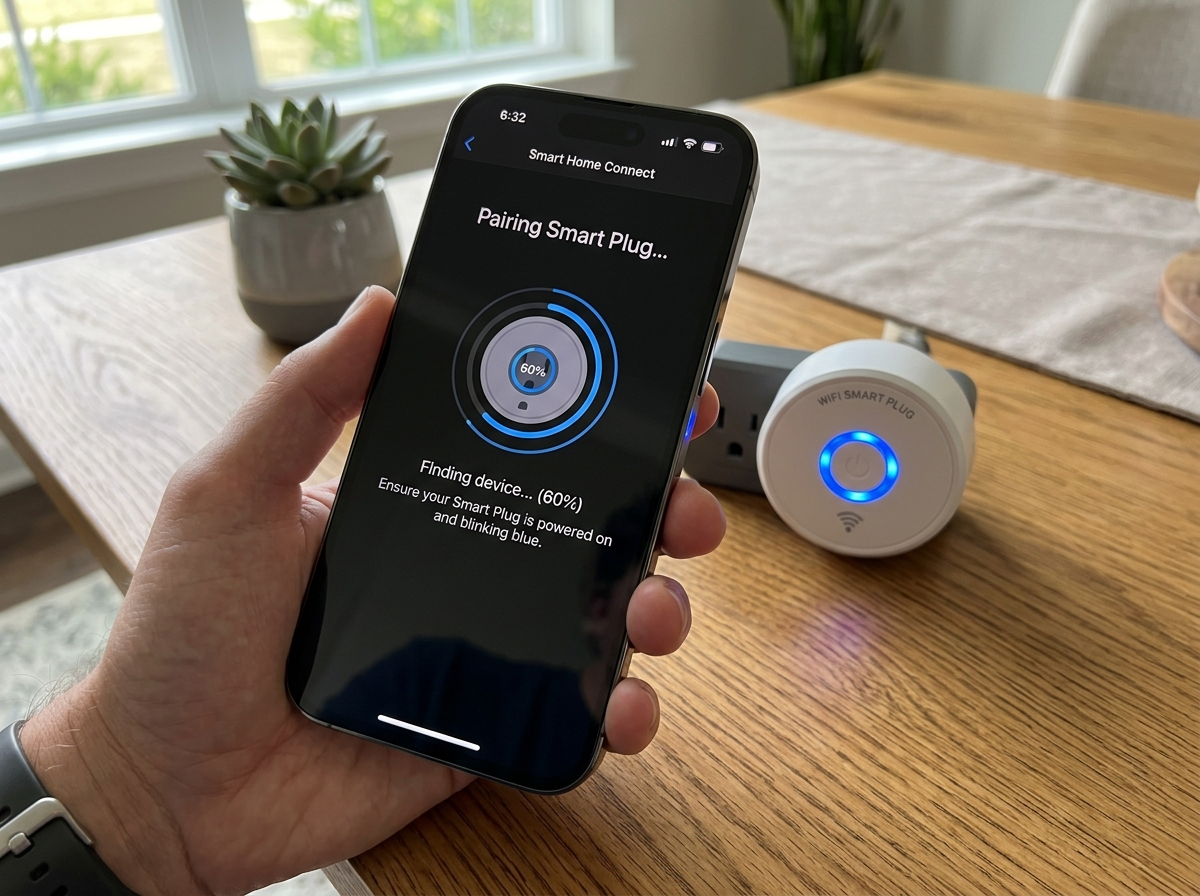
Step-by-Step Setup Instructions
Ready to go? Follow these universal steps to get your device online:
- Download the App: Every brand (like Kasa, TP-Link, or AiDot) has its own app. Download it from the App Store or Google Play and create an account. Some universal apps like “Smart Life” work with many different budget brands.
- Plug it In: Insert the smart plug into the outlet. You should see an LED light start blinking. This indicates it is in pairing mode. If it’s not blinking, hold down the physical power button for about 5-10 seconds until it starts.
- Add Device: In the app, tap the “+” icon. Most modern plugs use Bluetooth pairing to find your phone initially, making the process much smoother.
- Enter Wi-Fi Credentials: Select your 2.4GHz network and enter your password. The app will then “hand off” this information to the plug.
- Device Naming: This is crucial! Give your plug a clear, descriptive name like “Living Room Lamp” or “Office Heater.” Avoid vague names like “Plug 1,” especially if you plan to use voice commands later.
- Firmware Updates: Once connected, the app might ask to update the “firmware.” Always say yes. These updates provide essential security patches and performance improvements.
For a more visual walkthrough, you can follow this How to Set Up a Smart Plug Step by Step: A Beginner’s Guide.
Advanced Features: Automation, Energy, and Voice Control
Once the basics are down, it’s time to unlock the real power of these devices. Smart plugs aren’t just remote-controlled switches; they are automation engines.
One of the most useful features for beginners is Energy Monitoring. Some plugs can tell you exactly how many watts a device is drawing in real-time. One user discovered their old cable box was drawing 35 watts constantly—even when “off”—which was costing them $30 a year just to sit there! If you’re interested in managing multiple devices at once, you might want to look into beginner-friendly-smart-power-strips.
Scheduling vs. Timers: What’s the Difference?
Understanding these two features is key to mastering your beginner-guide-to-smart-plugs journey.
| Feature | How it Works | Best For… |
|---|---|---|
| Scheduling | Set specific times/days for the plug to turn on or off (e.g., 7:00 AM daily). | Daily routines, morning coffee, porch lights at sunset. |
| Timers | A countdown that turns the plug off after a set duration (e.g., turn off in 30 mins). | Phone chargers, curling irons, slow cookers. |
| Circadian/Sunrise | Syncs with local sunrise/sunset times automatically. | Security lighting, holiday decorations. |
Voice Control is the ultimate “cool” feature. By linking your plug’s app to Alexa, Google Assistant, or Siri, you can control your home with simple commands. “Alexa, turn on the Christmas Tree” is a lot more satisfying than crawling behind the pine needles to reach a wall switch. To learn more about the technical side of this, check out How to Set Up a Smart Plug For Home Automation.
Real-World Use Cases in a Beginner Smart Plug Guide
Not sure where to start? We’ve gathered some of the best “hacks” from experts and editors to inspire you:
- The Morning Hero: Schedule your coffee maker to start five minutes before your alarm goes off. Just make sure the physical switch on the coffee maker is left in the “on” position!
- The Safety Net: Plug your curling iron or hair straightener into a smart plug with a 30-minute auto-off timer. Never panic at work again.
- Pet Comfort: Use a smart plug for a pet fountain. If the trickling noise bothers you at night, set a schedule to turn it off during your sleeping hours.
- The “Magic” Trick: CNET editors suggest using smart plugs for kids’ bedside lamps. You can tell them you have “magic powers” and turn the lights off from the hallway using the app (though they’ll eventually catch on!).
- Network Maintenance: Plug your Wi-Fi router into a smart plug. If the internet gets sluggish, you can trigger a “restart” routine that cuts power for 30 seconds and then turns it back on—just make sure you use a plug that allows local control without an active internet connection!
- Holiday Cheer: Automate your holiday lights to turn on exactly at sunset and off at midnight. It saves energy and ensures your house always looks festive.
For a comprehensive look at what’s possible this year, dive into The Ultimate Guide to Smart Plugs in 2025.
Safety, Compatibility, and Common Questions
We get it—electricity can be intimidating. But rest assured, when used correctly, smart plugs are incredibly safe. The most important thing to check is the Amperage Rating.
Most standard smart plugs are rated for 10A or 15A (about 1200 to 1800 watts). This is perfect for lamps, fans, and small electronics. However, if you are using a high-power appliance like a space heater, a large air conditioner, or an Indian geyser, you must use a heavy-duty plug rated for 16A. Using a low-rated plug for a high-draw appliance can cause overheating.
Always look for safety certifications like UL (Underwriters Laboratories), ETL, or BIS (Bureau of Indian Standards). These labels prove the device has been tested for fire safety and electrical stability.
Can smart plugs work without the internet?
This is a common concern. If your Wi-Fi goes down, you lose the ability to control the plug via your smartphone app or voice assistant. However:
- Physical Buttons: Almost every smart plug has a manual “on/off” button on the side.
- Local Schedules: Many high-quality plugs (like those from Kasa) store their schedules locally. This means if the internet goes out, the lamp will still turn on at 7:00 PM as programmed.
- Bluetooth Fallback: Some newer models allow you to control the plug via Bluetooth if you are standing nearby, even without Wi-Fi.
Do smart plugs increase my electricity bill?
Technically, a smart plug uses a tiny amount of electricity to stay connected to your Wi-Fi—usually less than 1 watt when idle. This costs roughly $1 to $2 per year. However, the energy you save by killing “vampire loads” and automating your lights far outweighs this cost. As we mentioned, the potential savings can reach over $100 annually.
How do I troubleshoot connection issues?
If your plug is acting up, don’t throw it out the window just yet. Try these steps:
- Check Signal Strength: Smart plugs need a decent Wi-Fi signal (at least -70 dBm). If the plug is behind a heavy couch or in a far corner of the house, it might struggle to stay connected.
- The “Power Cycle”: Unplug it, wait 10 seconds, and plug it back in. It’s a cliché for a reason—it works!
- Router Limits: Most standard home routers can handle about 30-50 smart devices. If you’ve gone overboard with smart bulbs and plugs, your router might be overwhelmed.
- Factory Reset: If all else fails, hold the power button for 10-15 seconds to wipe the settings and start the setup process from scratch.
For more detailed troubleshooting, refer to this 2026 Setup Guide.
Conclusion
Stepping into home automation doesn’t have to be a shocking experience. As this beginner smart plug guide has shown, these devices are the perfect “gateway” to a more efficient, secure, and convenient lifestyle. From saving money on your monthly bills to the simple joy of a pre-warmed coffee pot, the benefits are clear.
At FinMoneyHub, we believe that technology should work for you, not the other way around. By mastering simple devices like smart plugs, you’re laying the foundation for more complex smart routines and a truly digital lifestyle. Start with just one or two plugs, get a feel for the app, and soon you’ll be wondering how you ever lived without them.
Ready to expand your knowledge? Check out our beginner-guide-to-smart-plugs for more tips on building your smart home from the ground up. Welcome to a smarter, more connected way of living!
