
A Practical Guide to Building Your First Automation Workflow
What Is a Beginner Automation Routine Guide (And Why It Matters)
A beginner automation routine guide is a step-by-step roadmap for setting up workflows that handle repetitive tasks automatically — no coding required. Here’s what you need to know to get started fast:
Quick-start steps for building your first automation routine:
- Identify a repetitive task you do at least 3 times per week (email sorting, data entry, reminders)
- Choose a beginner-friendly tool like Make.com, Zapier, or your smart home app
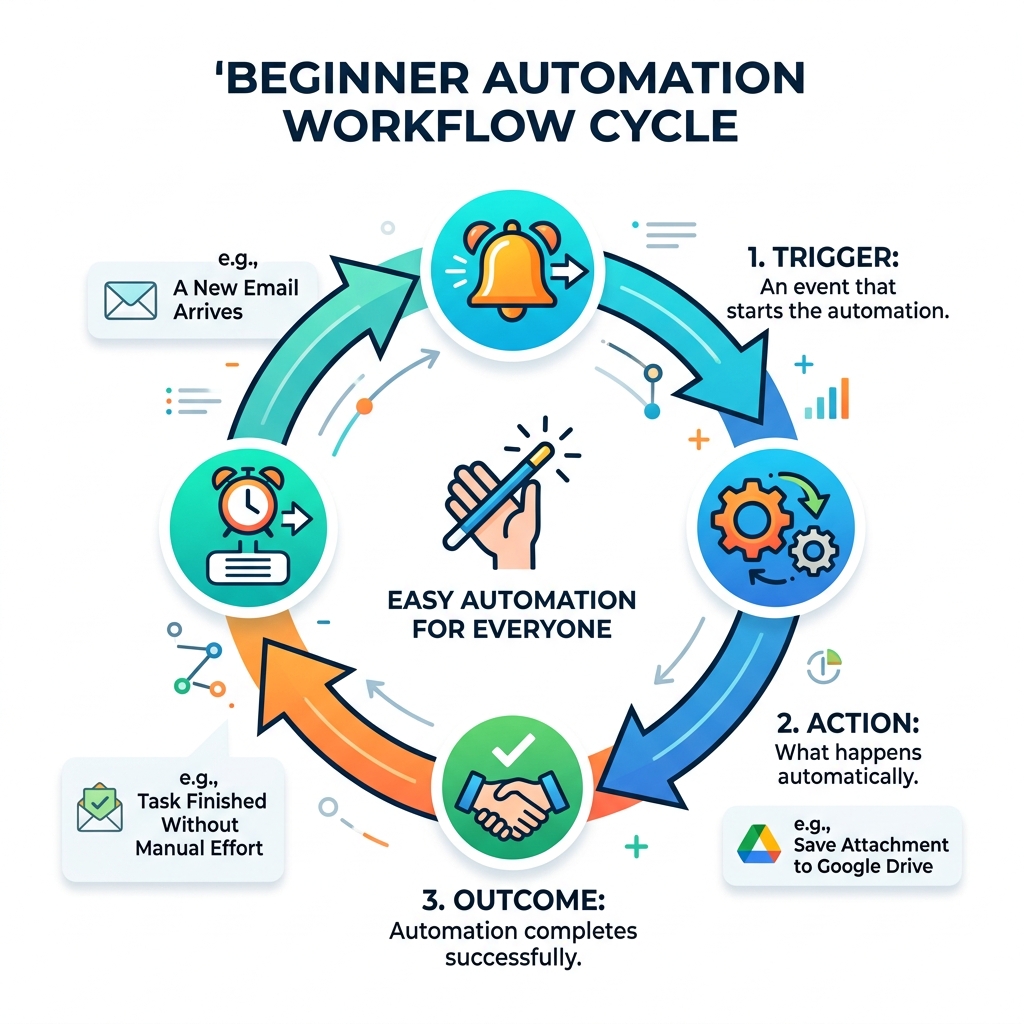
- Set a trigger — the event that starts the automation (e.g., a new email arrives)
- Add an action — what happens next (e.g., save attachment to Google Drive)
- Test with sample data before going live
- Monitor and adjust as needed
Think about the last time you were deep in focused work and had to stop to manually sort emails, update a spreadsheet, or check your smart home devices one by one. Research from UC Irvine found it takes an average of 23 minutes to regain full focus after an interruption. Those small manual tasks aren’t just annoying — they’re quietly draining your day.
Automation fixes this. It hands off the mechanical, predictable work to software, so your attention stays where it actually matters.
Whether you’re managing a smart home setup with fragmented devices, drowning in repetitive digital tasks, or just tired of doing the same thing manually over and over — automation gives you back both your time and your mental energy.
The good news? You don’t need a technical background to start. Modern tools are visual, intuitive, and often free to begin with.
Why You Need a Beginner Automation Routine Guide
If you feel like your day is a never-ending cycle of “digital chores,” you aren’t alone. We often spend hours on tasks that require zero creativity but high attention to detail. This is exactly where a beginner automation routine guide becomes your secret weapon.
The statistics are compelling: according to a 2023 IBM survey, 92% of executives agree that by 2025, their organization’s workflows will be digitized and benefit from AI-powered automation. If the biggest companies in the world are moving this way, it’s because the ROI on time is massive. By automating just 30 minutes of manual work a day, you reclaim 180 hours a year–that’s over seven full days of your life back!
Beyond just professional data entry, automation is transforming how we live at home. From security to comfort, learning about smart home automation apps is the first step toward a home that thinks for you.
Preserving Cognitive Bandwidth
Every time you have to decide which folder an email belongs in or remember to turn off the porch light, you use up “cognitive bandwidth.” This leads to decision fatigue. When we automate these routine tasks, we offload the mental burden.
Take morning routines, for example. Instead of fumbling for light switches and checking the weather manually, a simple automation can slowly brighten your smart bulbs to a “cool blue” (which research shows is more energizing than warm light) and have your smart assistant read your calendar while you brew coffee. This allows you to start your day with calm intention rather than reactive chaos.
Enhancing Temporal Efficiency
Time is our most non-renewable resource. Manual data entry, sorting through hundreds of emails, and managing a fragmented schedule are “time thieves.” By using a beginner automation routine guide, you can set up “invisible assistants” that work 24/7.
Imagine a world where your meeting notes are automatically transcribed and summarized into action items, or where every invoice that hits your inbox is saved to a specific folder and logged in a spreadsheet without you lifting a finger. This isn’t the future; it’s what’s possible right now with simple, no-code tools.

Identifying Repetitive Tasks in Your Daily Workflow
The biggest hurdle for most beginners isn’t the technology—it’s knowing what to automate first. You don’t want to automate a task you only do once a year. You want to target the “low-hanging fruit” that eats your time daily.
To find these, we recommend a “task audit.” For one week, keep a notepad next to your keyboard. Every time you feel bored or frustrated by a mechanical task, write it down. You can also explore simple home routines to see how others are streamlining their living spaces.
The “Three-Times” Rule
Our golden rule is simple: If you have to do it more than three times a week, and it follows a predictable set of rules, it’s a candidate for automation.
- Does it involve “Copy and Paste”? Automate it.
- Does it happen at the same time every day? Automate it.
- Does it involve moving data from one app to another? Automate it.
High-Impact Foundational Areas
If you’re stuck, start with these four areas. They offer the highest “time-saved-to-effort” ratio:
- Email Management: Automatically labeling emails or saving attachments to the cloud.
- File Organization: Renaming downloads or backing up documents.
- Calendar Syncing: Creating “buffer” times between meetings automatically.
- Smart Home Basics: Setting “Away” modes that lock doors and lower thermostats.
For those using voice technology, checking out the best routines for smart assistants can provide immediate wins.
The Core Components of a Beginner Automation Routine Guide
To build a workflow, you need to understand the “language” of automation. Most platforms use a visual builder where you connect blocks together. It’s a bit like digital LEGOs.
Understanding Triggers and Actions
Every automation has two main parts:
- The Trigger: This is the “If” part of the equation. It’s the event that starts the engine. (e.g., “IF a new response is submitted to my Google Form…”)
- The Action: This is the “Then” part. It’s what the computer does in response. (e.g., “…THEN add a row to my Google Sheet.”)
| Component | Definition | Real-World Example |
|---|---|---|
| Trigger | The starting event | Receiving a Gmail with an attachment |
| Action | The resulting task | Uploading that attachment to Dropbox |
| Module | An app connection | The “Gmail” or “Dropbox” block in the builder |
| Webhook | Real-time data push | A notification sent instantly from a store to your app |
Advanced Logic: Routers and Filters
As you get more comfortable, you’ll want your “assistant” to be smarter.
- Filters act as gatekeepers. You might say, “Only save the attachment IF the email comes from my boss.”
- Routers allow for branching paths. “IF the email is an invoice, send it to the Finance folder; IF it’s a newsletter, send it to the Reading folder.”
This conditional branching is what separates a simple “link” from a truly powerful beginner automation routine guide workflow.
Step-by-Step: Building Your First Automation Scenario
Ready to build? We’ll use a classic example: The “Lead Collector.” This workflow takes info from a website form and puts it into a spreadsheet so you never lose a contact.
- Set up your accounts: Sign up for a tool like Make.com or Zapier. Most have free tiers that allow for 100 to 1,000 operations per month.
- Authenticate your apps: You’ll need to “log in” to Google Forms and Google Sheets through the automation platform to give it permission to move your data.
- Create the Trigger: Search for “Google Forms” and select “Watch Responses.”
- Map the Fields: This is the most important part. You tell the system: “Put the ‘Name’ from the form into ‘Column A’ of the sheet, and the ‘Email’ into ‘Column B’.”
- Save and Turn On: Once the “path” is built, flip the switch to “Active.”
For more hands-on inspiration, you can look into easy DIY home automation projects to see how these same logic steps apply to physical devices.
Practical Examples for Your Beginner Automation Routine Guide
Once you’ve mastered the Lead Collector, try these:
- The “Receipt Wrangler”: Trigger: New email with “Receipt” in the subject. Action: Save to a “2024 Taxes” folder in Google Drive.
- The “Social Echo”: Trigger: New post on Instagram. Action: Share the same image and caption to your LinkedIn or X (formerly Twitter) profile.
- The “Daily Briefing”: Trigger: 7:00 AM. Action: Your smart assistant reads your top 3 calendar events and the current weather.
Testing and Debugging Your Workflow
Never assume an automation works the first time. Most platforms have a “Run Once” button.
- Submit a “fake” entry into your form.
- Click “Run Once.”
- Watch the little bubbles move through the workflow.
- If a red error icon appears, click it! It will usually tell you exactly what went wrong (e.g., “Folder not found” or “Incorrect password”).
Scaling and Optimizing Your Digital Ecosystem
Once you have three or four simple automations running, you’ll start to see your digital ecosystem take shape. This is where you can begin adding AI. Instead of just moving an email, you can send the email text to an AI module to “summarize the main request” before it ever reaches your eyes.
As you scale, keep an eye on your smart appliance automation to ensure your physical and digital worlds are talking to each other. For example, your “Work Mode” automation could silence your phone and turn on a specific smart light in your office.
Moving from Simple to Complex Commands
At FinMoneyHub, we specialize in helping you bridge the gap between “one-click” tasks and complex command capabilities. You don’t just want your lights to turn on; you want them to turn on only if it’s after sunset and your smart lock has been opened by a specific user code.
Our goal is to help you achieve “digital synergy,” where your smart assistant, your phone apps, and your work tools operate as a single, cohesive unit. This level of automation turns a “smart home” into a “genius home.”
Avoiding Common Beginner Pitfalls
We’ve seen it all, and most beginners make the same three mistakes:
- Overcomplicating: Don’t try to build a 20-step workflow on day one. Start with two steps.
- Ignoring Updates: Apps change their interfaces. Once a month, check your “dashboard” to ensure all your connections are still “green.”
- Lack of Human Oversight: For high-stakes tasks (like sending an email to a client), use a “Draft” action instead of a “Send” action. This lets you give it a final look before it goes out.
Frequently Asked Questions about Automation
Do I need to know how to code to start?
Absolutely not. Modern automation is “No-Code.” If you can drag a file into a folder or fill out a web form, you have the technical skills required to use a beginner automation routine guide.
What are the best free tools for beginners?
We recommend starting with Zapier (great for simplicity) or Make.com (great for visual learners). For smart home enthusiasts, IFTTT (If This Then That) is the gold standard for connecting physical devices like lights and thermostats.
How do I ensure my automated data is secure?
Always use “App Passwords” or OAuth (the “Log in with Google/Microsoft” buttons) rather than your main password. Only give the automation tool the permissions it actually needs. Most reputable platforms use bank-level encryption to keep your data moving safely.
Conclusion
Building your first automation isn’t just about saving five minutes on a spreadsheet; it’s a strategic investment in your well-being. By reclaiming your time and reducing the mental clutter of repetitive tasks, you’re giving yourself the freedom to focus on what truly matters—whether that’s growing your business, spending time with family, or simply enjoying a quieter, more intentional morning.
At FinMoneyHub, we believe that technology should serve you, not the other way around. With our focus on complex command capabilities and smart device synergy, we’re here to help you navigate the journey from curious beginner to automation expert.
Start your automation journey today and see how much more you can achieve when the routine stuff runs itself.
