
Stop doing chores with this easy home automation setup
Your Chores Are Already Automated — You Just Don’t Know It Yet
An easy home automation setup is exactly what it sounds like: a simple system that makes your home do repetitive tasks for you, automatically, without you lifting a finger.
Here’s the quick version of how to get started:
- Pick a hub — Home Assistant Green, Sonoff iHost, or a Raspberry Pi
- Choose your protocol — Zigbee for local, reliable, low-power devices
- Buy a starter kit — smart plugs, bulbs, and a motion sensor ($50-$150 total)
- Connect and configure — plug in your hub, access it via your browser, follow the onboarding
- Create your first automation — lights on at sunset, off at midnight
That’s it. No electrician. No coding. No week-long research spiral.
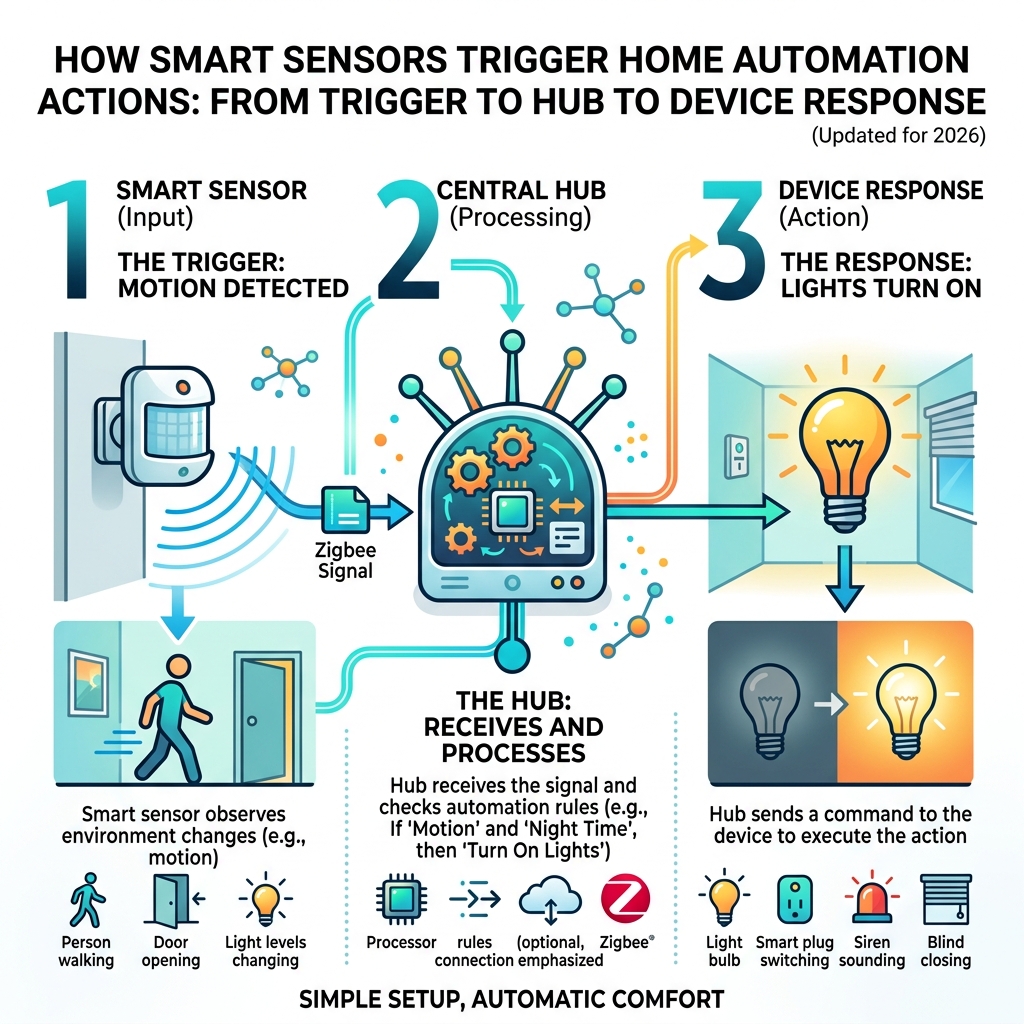
Think of home automation as a simple cause-and-effect relationship. Something happens (the sun sets, a door opens, motion is detected), and your home responds (lights turn on, the coffee maker starts, a notification pops up on your phone).
The real magic? You set it up once, and it just keeps working — so you don’t burn mental energy on the small stuff anymore.
Most people assume this requires serious technical skills. It doesn’t. Modern hubs and Zigbee devices are designed to be beginner-friendly, and the community support behind platforms like Home Assistant means you’re never troubleshooting alone.
The time you spend setting up an automation is a one-time investment. Every day after that, it pays you back.
Choosing Your Hub: The Brain of an Easy Home Automation Setup
When we talk about an easy home automation setup, the “hub” is the most critical decision you’ll make. Think of the hub as the conductor of an orchestra; it tells every device when to play its part. Without a central brain, you end up with a “smartass home”—a collection of gadgets that only one person knows how to operate, leaving everyone else frustrated.
To choose the right brain, we first need to understand how these devices talk to each other.
| Protocol | Range | Power Usage | Reliability | Best For |
|---|---|---|---|---|
| WiFi | High | High | Moderate | High-bandwidth (Cameras) |
| Zigbee | Moderate | Very Low | High (Mesh) | Sensors, Bulbs, Plugs |
| Z-Wave | High | Low | Very High | Locks, Heavy Duty |
Local vs Cloud Control: Why Privacy Wins
Most beginners start with “Cloud” devices (like basic WiFi bulbs). These send your data to a server in another country before turning on your light. If your internet goes down, your “smart” home becomes “dumb.”
At FinMoneyHub, we advocate for Local Control. This means your data stays inside your four walls. It’s faster (no round-trip to a server), more private, and it works even if your ISP has an outage. By using a local hub, you avoid “vendor lock-in,” meaning you can mix and match brands like IKEA, Sonoff, and Philips without needing ten different apps.
The Power of Mesh Networking
Zigbee is the gold standard for beginners because it creates a “mesh.” Every plugged-in device (like a smart plug) acts as a signal repeater. The more devices you add, the stronger your network becomes. It’s the ultimate “set it and forget it” technology.
What is the Easiest Smart Hub to Start With?
If you want to get up and running by dinner time, you have three main paths:
- Home Assistant Green: This is the “plug-and-play” gold standard. It comes with everything pre-installed. You just plug in the power and an Ethernet cable.
- Sonoff iHost: A powerful local AI server that focuses on privacy. It’s excellent for those who want a sleek interface right out of the box.
- Raspberry Pi: For the DIY enthusiast. It’s affordable and flexible, but requires you to “flash” software onto an SD card yourself.
Before diving into complex hubs, some find it helpful to start with a smart speaker setup for beginners to get a feel for voice control. However, for true automation, a dedicated hub is a must. You can also check out these simple google home setup tips if you’re looking to integrate voice assistants with your local hub later on.
Cloud vs Local Control: Which is Better for Beginners?
While cloud-based systems are often cheaper upfront, they come with hidden costs:
- Subscription Fees: Many cloud brands charge monthly to save video or use advanced features.
- Latency: That 2-second delay between pressing a button and the light turning on? That’s the cloud.
- Obsolescence: If the company goes out of business, your devices stop working.
Local control via Home Assistant or iHost removes these risks entirely. You own the hardware, you own the data, and you own the “rules” that run your home.
Step-by-Step Guide to Your First Smart Hub Installation
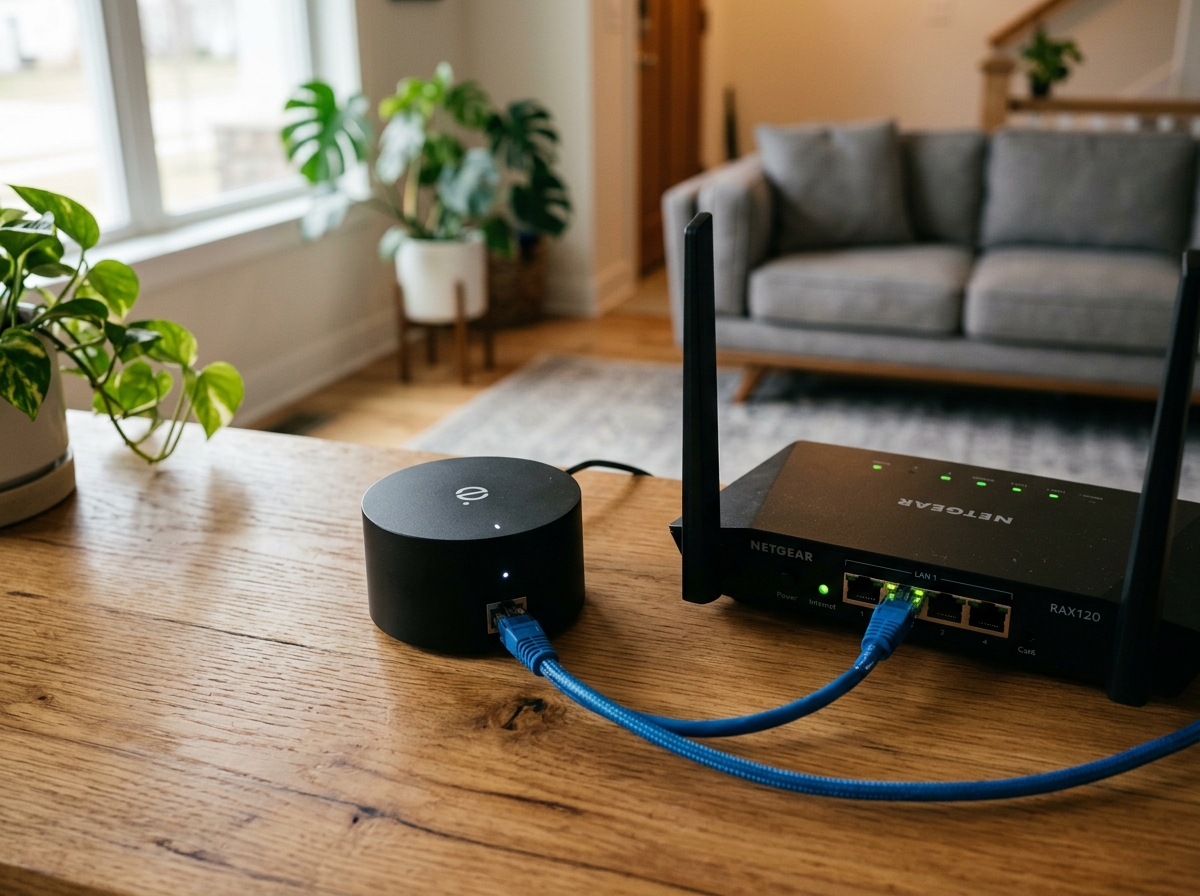
Setting up your hub is easier than setting up a new smartphone. We recommend a “headless” setup, which means you don’t need a monitor or keyboard for the hub itself—you’ll do everything from your laptop or phone.
- Physical Connection: Connect your hub (Home Assistant Green or Raspberry Pi) directly to your router using a wired Ethernet cable. While some hubs support WiFi, a wired connection is 100% more reliable for your home’s “brain.”
- Power Up: Plug in the power adapter and wait about 5-10 minutes. The hub is busy setting up its internal filing system.
- Access the Interface: Open a web browser on your computer and type
http://homeassistant.local:8123. If you’re using an iHost, tryhttp://ihost.local. - Onboarding: Follow the prompts to create an account. Pro tip: Use a strong password and write it down. This is the key to your house!
- Location Services: Set your home’s location accurately. This allows the hub to know exactly when the sun rises and sets in your neighborhood, which is the foundation for simple home automation routines.
Essential Hardware for an Easy Home Automation Setup
Don’t try to automate the whole house in one weekend. Start with a “Starter Kit” approach. We recommend:
- 2x Smart Bulbs: Great for lamps or porch lights. Check out this beginner-friendly guide to installing smart bulbs at home for the basics.
- 2x Smart Plugs: Perfect for “dumb” appliances like coffee makers or fans.
- 1x Motion Sensor: The secret sauce for “no-touch” lighting.
- 1x Contact Sensor: For doors or windows.
If you’re feeling ambitious, follow these 10 easy steps to install smart bulbs at home to ensure your lighting is perfect from day one.
How to Pair Zigbee Devices Without Frustration
Pairing Zigbee devices is where most beginners get stuck, but it’s simple if you follow the “proximity rule.”
- Bring the device to the hub: Don’t try to pair a sensor that’s already mounted three rooms away. Bring it within 3 feet of the hub for the initial handshake.
- Enter Pairing Mode: Usually, this involves pulling a battery tab or holding a small button for 5 seconds until a light flashes.
- Search in the App: In Home Assistant, go to Settings > Devices & Services > Add Integration > Zigbee Home Automation (ZHA).
- Name Everything: Don’t leave it as “ZigbeeDevice01.” Name it “Living Room Motion Sensor.” Trust us, future-you will thank you.
- Assign Areas: Put devices into “Rooms” or “Areas” in the software. This makes it much easier to say “turn off all kitchen lights.”
This same logic applies to security; for example, the easy setup of smart door lock for beginners 2 follows a very similar pairing process.
Creating Your First “Useful, Not Annoying” Automations
The difference between a “smart home” and a “remote-controlled home” is automation. If you have to pull out your phone to turn on a light, you haven’t automated anything—you’ve just replaced a wall switch with an expensive glass rectangle.
A true easy home automation setup uses Triggers, Conditions, and Actions.
- Trigger (The “When”): “When the sun sets…”
- Condition (The “But Only If”): “…but only if I am home…”
- Action (The “Do This”): “…then turn on the porch light.”
Top 5 Beginner Routines for an Easy Home Automation Setup
Here are the “Quick Wins” that provide immediate value:
- The Sunset Warm-Up: 30 minutes before sunset, turn on the living room lamps to 40% brightness. This prevents that “stumbling in the dark” feeling.
- The “Forgot the Window” Alert: If the HVAC is on and a window contact sensor is open for more than 5 minutes, send a notification to your phone.
- The Nightlight Path: Between 11 PM and 6 AM, if the hallway motion sensor trips, turn the bathroom light on to just 10% (and maybe a warm red color) so you don’t wake yourself up fully.
- The Energy Saver: If no motion is detected in the office for 20 minutes, turn off the smart plug connected to the monitor and desk lamp.
- The Morning Coffee: Use easy smart appliance automation to start your “dumb” coffee maker (via a smart plug) 10 minutes before your alarm goes off.
For more inspiration, explore simple home automation routines-2 or these beginner-friendly assistant automation tips.
Designing a Clean Dashboard for Wall Tablet Control
Once you have 10+ devices, you’ll want a central station. An old Android tablet or an iPad can be mounted to the wall to act as your home’s command center.
- Keep it Simple: Only put the things you use daily on the main screen (Lights, Thermostat, Locks).
- Visual Feedback: Use colors to show status—red for a locked door, yellow for a light that’s on.
- Guest Mode: Make sure the dashboard is intuitive enough that a houseguest can figure out how to turn on the guest room light without a manual.
Check out our guide on smart home automation apps for beginners to find the best interface for your tablet.
Security, Privacy, and Troubleshooting Your Smart Home
We take security seriously at FinMoneyHub. A smart home shouldn’t be a gateway for hackers.
Security and Privacy Steps to Take Immediately
- Enable 2FA: Always use Two-Factor Authentication on your hub account.
- Isolate Your Devices: If your router supports it, put your smart devices on a separate “IoT” WiFi network. This keeps your main laptop and banking info away from your smart light bulbs.
- Local-Only Mode: For devices that have an app, see if you can block their internet access at the router level once they are paired with your local hub.
- Update Firmware: Check for updates once a month. Manufacturers release these to patch security holes.
- Delete Voice Logs: If you use Alexa or Google for voice control, go into the settings and set voice recordings to auto-delete.
If you are using Amazon’s ecosystem, follow the easy setup for alexa at home guide while keeping these privacy tips in mind.
Common Setup Problems and Quick Fixes
- Device Offline: 90% of the time, this is a range issue. Add a Zigbee smart plug halfway between the hub and the “dead” device to act as a repeater.
- Pairing Failures: Check the battery. Even “new” devices sometimes sit in a warehouse for a year and arrive with a weak battery.
- Latency (Lag): If your voice commands are slow, it might be your internet. Try using simple voice control for smart gadgets that integrates locally with Home Assistant to bypass the cloud.
- Interference: Keep your hub at least 3 feet away from your WiFi router. Both use the 2.4GHz frequency and can “shout” over each other.
Frequently Asked Questions about Home Automation
Do I need technical skills or can true beginners do this?
Absolutely not. While home automation used to be for programmers, modern tools like Home Assistant’s “Blueprints” allow you to download pre-made automations created by experts. You just select your light and your sensor from a dropdown menu, and the “code” is written for you. It’s as easy as filling out an online form.
How much will a basic smart home actually cost?
You can start an easy home automation setup for less than the cost of a nice dinner out.
- Starter Budget ($70-$150): A hub (like a Raspberry Pi or a refurbished thin client) and 3-5 Zigbee devices.
- The Payback: Statistics show that smart thermostats save 8% or more on heating and cooling costs. Most users find that their devices pay for themselves within 12 months through energy savings alone. Smart plugs eliminate “phantom loads” from devices that stay on standby, further reducing your bill.
Will my smart home work during internet outages?
If you follow our advice and use a local hub with Zigbee devices, yes! Your sunset lights will still turn on, your motion sensors will still trigger, and your wall switches will still work. The only thing you’ll lose is the ability to control things from your phone while you’re away from home (unless you set up a secure remote access tunnel like Tailscale).
Conclusion
Setting up an easy home automation setup is one of the most rewarding weekend projects you can take on. At FinMoneyHub, we believe technology should serve you, not the other way around. By choosing local control and focusing on “useful, not annoying” routines, you reclaim your time and reduce the daily friction of managing a household.
Our USP is providing you with complex command capabilities without the complexity. You don’t need to be an engineer to have a home that “thinks” for itself. Start small—maybe just a single motion sensor in the pantry—and watch how quickly you’ll want to expand to the rest of the house.
Ready to dive deeper into specific routines? More info about smart assistant routines is just a click away. Happy automating!
