
The Best Ways to Integrate Smart Devices into Your Morning Routine
Why Integration Smart Device Routines Are the Smarter Way to Start Your Day
Integration smart device routines are automated sequences that link multiple smart home devices together, triggered by a single command, time, location, or sensor event — so your home does the work for you.
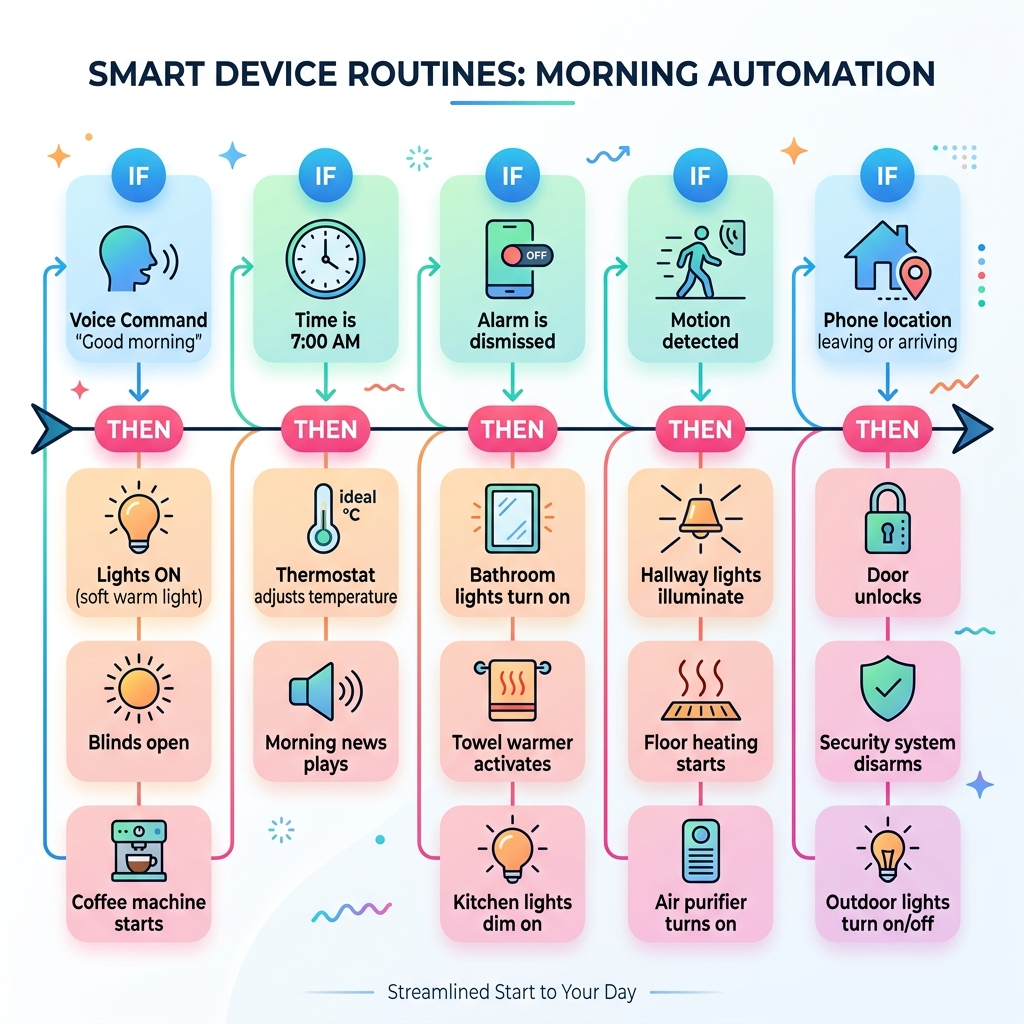
Here are the main ways to integrate smart devices into your morning routine:
- Voice command — Say “Good morning” to trigger lights, thermostat, and coffee maker at once
- Time-based schedule — Devices activate automatically at a set time each day
- Alarm dismissal — Dismissing your morning alarm kicks off a full home routine
- Motion sensor — Movement in the bedroom or hallway triggers lights and other devices
- Location trigger — Your phone’s location wakes the home as you return or signals it to sleep as you leave
Managing a growing collection of smart devices can quickly become frustrating. Lights from one brand, a thermostat from another, a coffee maker that only works with its own app — sound familiar?
The problem isn’t the devices. It’s that they’re not talking to each other.
That’s exactly what smart device routines solve. Instead of tapping five different apps every morning, one trigger sets everything in motion. Platforms like Google Home, Amazon Alexa, and Samsung SmartThings — along with integration tools like IFTTT — let you connect devices across brands into a single, seamless flow.
Google Home alone works with over 50,000 smart home devices from more than 10,000 brands. And IFTTT supports over 1,000 apps and smart home tools, acting as a bridge when devices don’t natively work together.
The result? A morning that runs itself.
Understanding Integration Smart Device Routines vs. Basic Automation
To truly master your home, we first need to distinguish between “smart technology” and “smart routines.” Smart technology refers to the individual pieces of hardware—your smart bulbs, your Wi-Fi-connected kettle, or your thermostat. Basic automation might involve a single device performing a task, like a light turning on at 7:00 PM.
However, integration smart device routines are the “connective tissue” of a modern home. They involve sequences where one trigger leads to multiple actions across different brands and device types. Think of it as the difference between playing a single note on a piano versus conducting a full orchestra.
When we look at simple home automation routines, we move away from manual control (opening five different apps) and toward ecosystem unification. A classic example is how Google Home routines can unify a “mess” of random gadgets. You might have Philips Hue lights in the bedroom, a TP-Link plug for the coffee maker, and a Nest thermostat. Without a routine, these are just isolated tools. With a routine, they become a unified system that anticipates your needs.
The logic follows a simple “If-This-Then-That” structure:
- IF the alarm is dismissed (Trigger)
- THEN turn on the bedroom lights to 20%
- AND start the coffee maker
- AND read the day’s weather forecast
Top Platforms for Morning Routine Integration
Choosing the right “brain” for your home is the first step in successful integration smart device routines. Most users gravitate toward one of the “Big Three” platforms.
| Feature | Amazon Alexa | Google Home | Samsung SmartThings |
|---|---|---|---|
| Primary Strength | Massive device compatibility | Superior AI & Search | Advanced sensor logic |
| Best For | Voice-heavy households | Google ecosystem users | Power users & DIYers |
| Routine Limit | High | 32 actions per routine | Very high |
| Connectivity | Wi-Fi, Zigbee, Matter | Wi-Fi, Matter | Zigbee, Z-Wave, Matter |
While these platforms are powerful, sometimes they need a little help talking to older or more niche devices. This is where IFTTT (If This Then That) comes in. With millions of published Applets, IFTTT acts as a universal translator, allowing you to create easy smart assistant routines even between brands that don’t officially support each other.
Customizing Integration Smart Device Routines with Google Assistant
Google Assistant is a powerhouse for morning transitions. One of its most useful features is the distinction between Personal and Household routines.
Personal routines are tied to your specific voice and account. When you say, “Hey Google, good morning,” it can check your specific calendar and tell you about your commute. Household routines, on the other hand, are accessible to everyone in the home—perfect for turning on the kitchen lights or adjusting the thermostat for the whole family.
When you automate daily routines & tasks with Google Assistant, you can include up to 32 actions in a single sequence. You can use “starters” (triggers) like voice commands, specific times, or even “presence sensing” which uses your phone’s location to know when you’ve woken up and moved to the kitchen.
Advanced Integration Smart Device Routines via SmartThings and Alexa
For those who want deeper technical control, Routines in SmartThings offer incredible flexibility. SmartThings uses a robust IF-THEN engine that can handle multiple conditions. For example, you can set a routine to run ONLY if it is a weekday AND motion is detected in the hallway.
When you use Routines in SmartThings, you can even include devices that are currently offline in your setup phase, and they will simply execute once they reconnect.
Alexa also offers unique integration capabilities, particularly with security hardware. Many users are now integrating Ring cameras with Alexa routines to enhance their morning awareness. Imagine your bedside Echo Show automatically displaying the front porch camera feed the moment you wake up, or your porch lights turning off automatically at sunrise.
Pro Tip: If you are using Home Assistant or other advanced hubs to trigger Alexa, pay attention to “binary sensor classes.” Alexa typically only recognizes sensors categorized as “door,” “window,” “opening,” or “motion” to trigger a routine.
Step-by-Step Guide: Setting Up Your Perfect Morning Routine
Creating a routine shouldn’t be intimidating. We recommend starting small and layering actions as you get comfortable.

1. Identify Your Trigger
Every routine needs a “starter.” For a morning flow, the most popular triggers are:
- Time-based: 7:00 AM every Monday through Friday.
- Voice-activated: “Hey Google, I’m awake.”
- Device-event: When your smart mattress detects you’ve left the bed or your phone alarm is dismissed.
2. Sequence Your Actions
Order matters! You don’t want the news blaring before you’ve even opened your eyes. A well-sequenced morning routine looks like this:
- Gradual Light Brightening: Set your smart bulbs to “Wake up” mode, transitioning from 1% to 100% over 15 minutes to mimic a sunrise.
- Climate Control: Adjust the thermostat from “Sleep” (e.g., 65°F) to “Home” (e.g., 70°F).
- Appliance Activation: Trigger the smart plug connected to your coffee maker.
- Information Briefing: Have your smart speaker read the weather, your first three calendar appointments, and a news summary.
For more detailed breakdowns, check out our beginner-friendly assistant automation tips.
3. Test and Refine
No routine is perfect on day one. You might find that the coffee takes longer to brew than expected, or the lights are too bright. Most platforms allow you to add “Delays.” For instance, you can turn the lights on at 7:00 AM but wait 10 minutes before the smart speaker starts talking.
Troubleshooting and Optimizing Your Smart Home Integrations
Even the best integration smart device routines can hit a snag. The most common culprit? Connectivity.
If a device stops responding, first check your Wi-Fi signal. Smart homes are only as strong as the network they run on. If you have dozens of devices, a standard ISP router might struggle; upgrading to a mesh Wi-Fi system can often solve “ghost” triggers or offline status issues.
Here are a few other optimization tips:
- Routine Audits: Every few months, go through your app and delete routines you no longer use. This prevents conflicting commands.
- Internet Dependency: Most routines (especially Google and Alexa) rely on the cloud. If your internet goes out, your routines likely won’t run. For critical tasks, consider a hub like SmartThings or Hubitat that supports local processing.
- Safety First: Never include devices in a routine that could be dangerous if triggered incorrectly, such as space heaters or ovens.
As we look to the future, AI and machine learning are set to make routines even “smarter.” We are moving toward a world where your home learns your patterns—noticing you wake up later on rainy days—and adjusts your best routines for smart assistants automatically.
For those with complex setups involving high-end security or home theaters, professional integrators can help bridge the gap between DIY gadgets and a truly seamless experience. They can ensure your simple security automation ideas are robust enough to provide real peace of mind.
Frequently Asked Questions about Smart Device Integration
Can I integrate devices from different brands into one routine?
Absolutely! This is the primary benefit of using a central platform like Google Home, Amazon Alexa, or Samsung SmartThings. As long as the brand is compatible with your chosen hub, you can synchronize them. If they aren’t natively compatible, tools like IFTTT act as a “bridge” to link them together. The emergence of the Matter standard is also making multi-brand synchronization easier than ever.
Do smart routines work without an internet connection?
Most popular voice-assistant routines are cloud-based, meaning they require an active internet connection to work. However, some platforms like SmartThings or Home Assistant allow for “local execution” of certain routines if the devices use Zigbee or Z-Wave. Always have a manual backup (like a physical light switch) for critical functions.
What are the best triggers for a morning routine?
The “best” trigger depends on your lifestyle. For deep sleepers, an alarm dismissal trigger is excellent because it ensures the routine only starts once you are actually awake. For those who like a gentle wake-up, a scheduled sunrise lighting trigger is preferred. If you have a non-traditional schedule, a motion sensor in the bathroom or kitchen can be the most reliable way to signal that your day has begun.
Conclusion
At FinMoneyHub, we believe that technology should serve you, not the other way around. By mastering integration smart device routines, you aren’t just playing with gadgets; you’re reclaiming your time and reducing the “mental load” of daily chores.
Whether you’re looking for simple home automation routines to get started or you’re ready to dive into complex command capabilities, the goal is the same: a home that anticipates your needs, saves energy, and provides peace of mind.
Ready to transform your morning? Start building your smart home today and experience the magic of a truly connected life.
