
Why Home Automation NFC Tags Are the Simplest Smart Home Upgrade You’re Not Using
Home automation NFC tags are small, passive stickers or cards that trigger smart home actions — like turning off lights, arming an alarm, or unlocking a door — when you tap your phone against them.
Quick answer: What can you do with home automation NFC tags?
- Bedtime routine — tap a bedside tag to dim lights, lock doors, and arm your alarm in one go
- Guest Wi-Fi access — guests tap a hallway tag to connect instantly, no password needed
- Kids’ media control — children scan a themed card to play their favorite show or playlist
- Leave-home kill switch — one tap near the door turns off all devices and sets the thermostat
- Smart lock triggers — tap a front-door tag to reliably unlock without opening an app
- Appliance reminders — scan a tag on your washing machine to start a timer notification
No wiring. No complex setup. A pack of 50 tags costs under $15.
Most smart home users spend more time managing their devices than actually enjoying them. Juggling apps, voice commands, and dashboards gets old fast. NFC tags cut through all of that — one tap, one action, done.
And the best part? They work even when your phone screen is off (on newer iPhones and most Android devices). No app needs to be open. No loading screens.
Whether you use Home Assistant, SwitchBot, or just your phone’s built-in shortcuts, NFC tags are one of the cheapest and most satisfying ways to make your home feel genuinely futuristic.
What Are Home Automation NFC Tags and How Do They Work?
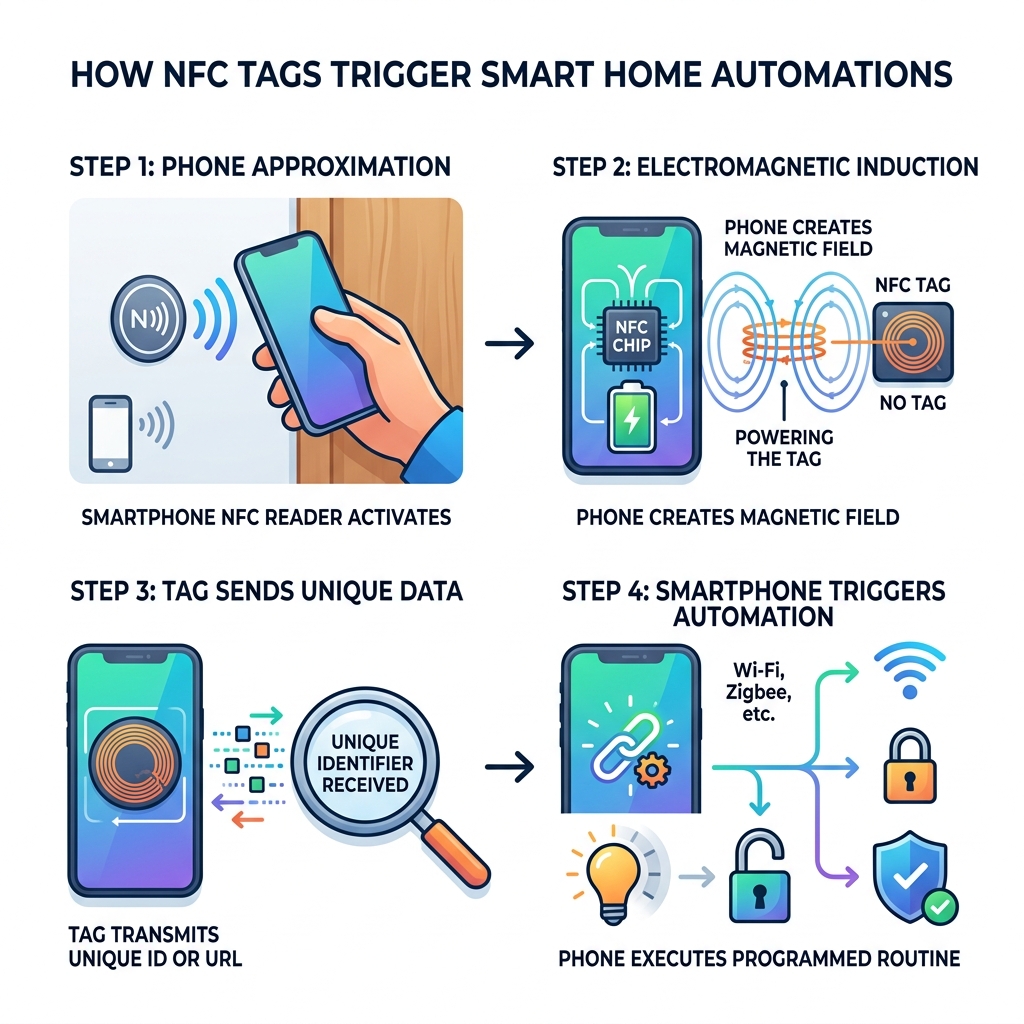
At their core, home automation NFC tags are tiny, passive electronic chips. “NFC” stands for Near Field Communication, a technology that allows two devices to talk to each other over very short distances—usually less than 10 centimeters.
Unlike your smart bulbs or Wi-Fi cameras, these tags don’t have batteries. They are powered by the smartphone that scans them through a process called electromagnetic induction. When you bring your phone close to the tag, the phone’s NFC reader creates a small magnetic field that “wakes up” the chip inside the tag. The tag then sends a tiny bit of data—usually a unique ID number or a URL—back to your phone.
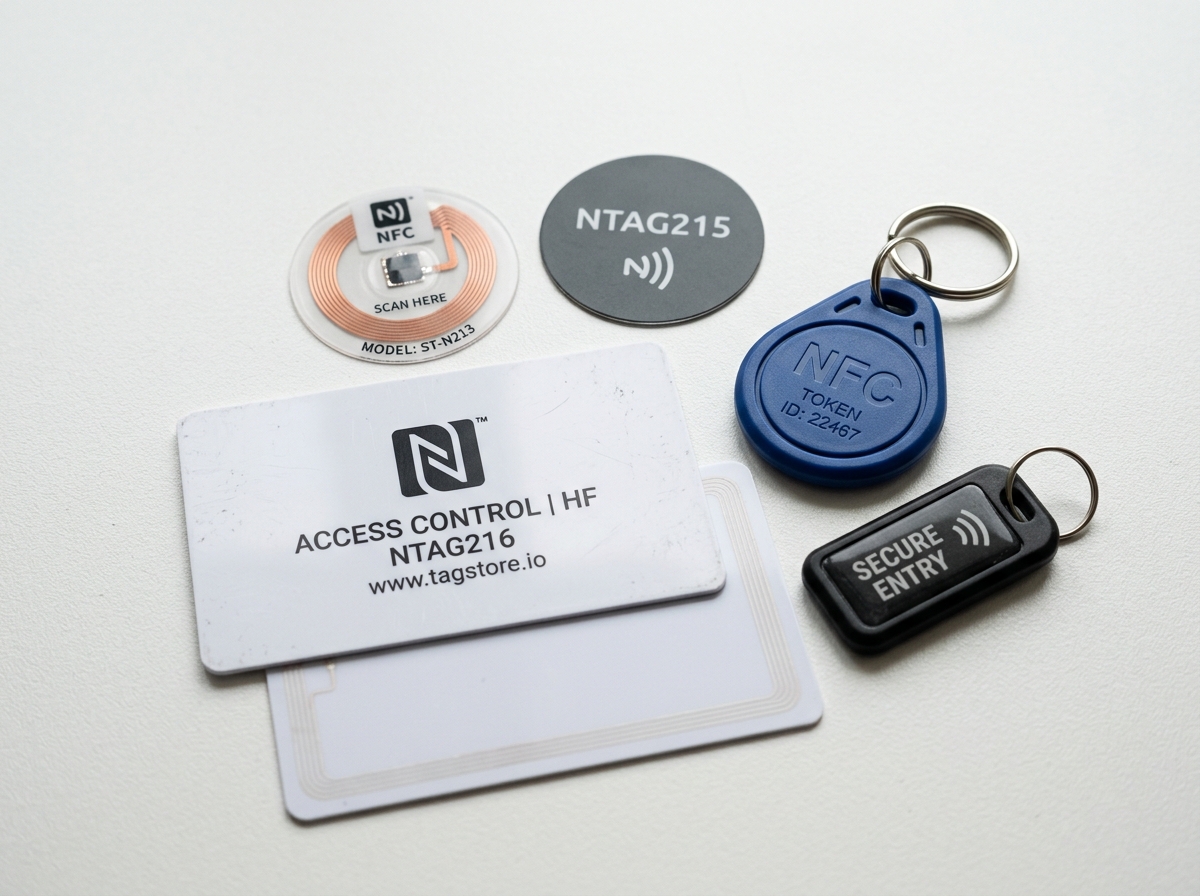
In smart homes, we mostly use the NTAG215 chip. These operate at a frequency of 13.56MHz and are the gold standard because they offer a great balance of storage (504 bytes) and compatibility. While 504 bytes sounds small, it is plenty of space to store the “trigger” that tells your smart home system to execute a complex sequence of commands.
Think of an NFC tag as a “virtual button” that you can stick anywhere. Because they are waterproof and don’t require wiring, you can put them on your lawnmower, under your dining table, or even on your pet’s collar.
7 Creative Ways to Use NFC Tags for Home Automation
If you are looking for easy-diy-home-automation-projects, NFC tags are the perfect starting point. They bridge the gap between the physical and digital worlds, allowing you to trigger simple-home-automation-routines without ever saying a word to a voice assistant.
Setting Up Your Sci-Fi Bedtime Routine with Home Automation NFC Tags
Imagine sliding into bed and simply tapping your phone against your nightstand. Instantly, the house goes into “Sleep Mode.”
By placing a tag on your bedside table, we can create a routine that:
- Turns off every light in the house.
- Arms the perimeter alarm.
- Sets your phone to “Do Not Disturb.”
- Logs your exact bedtime in a spreadsheet (great for settled “who went to bed later” debates with a spouse!).
- Adjusts the thermostat to your ideal sleeping temperature.
This is much more reliable than geofencing, which might accidentally trigger if you just walk near a window. With a tag, the intent is clear: you are in bed, and it’s time for sleep.
Creating a Guest-Friendly Interface Without App Installations
One of the biggest headaches in a smart home is guests. You don’t want to force your mother-in-law to download an app just to turn on the guest room lights.
Using home automation NFC tags, you can provide a frictionless experience. By programming a tag with a webhook or a universal link, a guest can scan a tabletop card to:
- Automatically connect to your guest Wi-Fi (no password typing required!).
- Open a digital dashboard on their phone’s browser to control room lights.
- Trigger a “Help” notification to your phone if they can’t find the extra towels.
Building a “Magic” Media Controller for Kids
This is a favorite in the Home Assistant community. You can buy PVC NFC cards and print custom artwork on them—perhaps a picture of Frozen or Bluey.
When your child taps the “Bluey” card against a dedicated reader or a phone, it triggers an automation to:
- Turn on the TV and soundbar.
- Open the Disney+ or YouTube app.
- Start the specific playlist or movie.
It’s a tactile, “magic” way for kids to interact with technology without needing access to a tablet or a complex remote.
Instant Security and Smart Lock Triggers
Sometimes geofencing (the feature that unlocks your door when you arrive home) fails or lags. Sticking a discreet NFC tag near your front door or on your gate acts as a perfect fail-safe.
A quick tap can unlock the smart lock, disarm the alarm, and even take a photo of the porch for your security logs. For added security, we recommend using “helpers” in your automation software to ensure the tag only works when your phone is already authenticated to your home network.
Smart Kitchen and Appliance Management
The kitchen is full of “analog” tasks that benefit from a digital boost.
- Washing Machine: Stick a tag on the lid. Scan it when you start a load to set a 2-hour timer that sends a notification to your TV when the laundry is done.
- Medication: Put a tag on a pill bottle. Every scan logs the dose and decrements a “pills remaining” counter, sending you a reminder when it’s time to refill.
- Manuals: Tired of losing the manual for your air fryer? Program a tag to open a PDF link of the manual on your phone.
Automated Work-from-Home and Focus Modes
If you have a home office, a tag on your desk is a game-changer. Tapping it can trigger a “Focus Mode” that turns your office lights to a cool white, closes the smart blinds to reduce glare, and turns on your PC via Wake-on-LAN. It’s the ultimate way to signal to your brain (and your smart home) that the workday has officially started.
The Ultimate “Leave Home” Kill Switch
We’ve all had that moment of doubt: “Did I leave the iron on?” Place a tag right by the front door. As you walk out, one final tap ensures every light is off, the thermostat is set to “Eco,” the robot vacuum starts its daily run, and the smart locks engage. It’s a peace-of-mind button that fits in a tiny sticker. Check out more simple-smart-home-automation-ideas for your exit routines.
Choosing the Best Hardware for Your Smart Home
Not all tags are created equal. When shopping for home automation NFC tags, you’ll likely see three main types: NTAG213, NTAG215, and NTAG216.
| Feature | NTAG213 | NTAG215 | NTAG216 |
|---|---|---|---|
| Memory (Bytes) | 144 | 504 | 888 |
| Compatibility | High | Universal | High |
| Best Use Case | Simple URLs | Home Automation | Large Data/V-Cards |
| Cost | Lowest | Affordable | Premium |
Our Recommendation: Stick with NTAG215. It is the most widely supported chip for home automation platforms like Home Assistant and SwitchBot.
Pro Tip: If you plan to stick a tag on a metal surface (like a fridge or a computer case), you must buy tags with an “anti-metal” or “on-metal” layer. Normal NFC tags will not work on metal because the material interferes with the magnetic field.
Step-by-Step: Programming Home Automation NFC Tags
Programming these tags is surprisingly simple. You don’t need to be a coder; you just need the right smart-home-automation-apps-for-beginners.
Setting Up the Home Assistant Companion App
If you are using Home Assistant, the process is built right into the mobile app:
- Open the app and go to Settings > Tags.
- Tap Add Tag.
- Give it a generic name (we suggest something like “TagBedsideLeft” so you can move it later if needed).
- Tap Create and Write.
- Hold your phone near the tag until it vibrates.
Once written, the tag is linked to your Home Assistant instance. You can then click the “Robot” icon next to the tag in the app to immediately start building an automation.
Writing Custom Actions and Webhooks
For those who want more flexibility—perhaps to allow guests to trigger actions without the app—you can use webhooks.
- Use an app like NFC Tools to write a specific URL to the tag.
- In your automation software, set the trigger to a “Webhook.”
- When any phone scans that tag, it hits that URL and triggers the action.
You can even add password protection to your tags using desktop NFC readers or mobile apps to prevent someone from accidentally overwriting your hard work.
Troubleshooting and Performance Tips
If your tags aren’t scanning reliably, check these three things:
- Phone Unlock: By default, most phones (especially Android) require the screen to be on and the phone to be unlocked for NFC to work. This is a security feature.
- Sweet Spot: Every phone has its NFC antenna in a different spot. On iPhones, it’s usually near the top camera. On many Pixels, it’s in the center. Find your “sweet spot” for a 100% success rate.
- Interference: If the tag is behind thick wood or near other magnets, the range will drop. Keep the path clear for the best results.
Frequently Asked Questions about NFC Tags
Do NFC tags work through walls or furniture?
Generally, no. NFC has a maximum range of about 10cm, but in practice, it’s usually 1-2cm. However, you can hide them! You can stick a tag on the underside of a thin wooden table or behind a plastic wall plate. As long as the material isn’t metal and isn’t too thick, the signal will pass through.
Can I use NFC tags with an iPhone?
Yes! Background NFC reading is available on iPhone XS, XR, and newer. On older iPhones, you may need to open the Control Center and tap the NFC reader icon manually. When you scan a tag on iOS, you might see a small notification banner at the top—tapping this banner will trigger the automation. If you use iOS Shortcuts, you can often set these to run automatically without the banner.
Are NFC tags secure for opening doors?
NFC tags can be cloned if someone gets physical access to them with a specialized device. However, for home use, the risk is low. Most home automation NFC tags setups require the scanning phone to be an “authorized device” within your Home Assistant or smart home system. This means even if a stranger clones your tag, their phone won’t have the “keys” to actually trigger your door lock.
Conclusion
At FinMoneyHub, we believe that the best technology is the kind that disappears into your life. Home automation NFC tags are the ultimate example of this. They are cheap, renter-friendly, and offer complex command capabilities that voice assistants sometimes struggle with.
Whether you’re building a “Magic” jukebox for your kids or a high-tech “Leave Home” switch, these tiny stickers are the key to a more intuitive, sci-fi-inspired home. Ready to dive deeper into easy-diy-home-automation-projects-2? Start with a pack of NTAG215 stickers and see how one tap can change your daily routine.
For more tips on simple-home-automation-routines-2, visit More smart home resources and join the revolution of contactless home control.
